
For individuals who regularly read foreign periodicals, academic papers, industry reports, and technical documentation, PDF document translation, Free document translation, Thesis translation, and High-quality PDF translation have become core requirements for modern cross-linguistic information retrieval.
However, traditional tools often struggle with complex PDFs, leading to issues such as disrupted layouts, broken reading logic in double-column papers, unreadable scanned versions, failed parsing of formulas and tables, and inaccurate professional terminology. These bottlenecks significantly hinder the efficiency of Thesis translation and professional document comprehension.
In this context, SelectTranslate has specifically optimized the PDF translation experience. By combining PDF Plus with Free document translation capabilities, it effectively enhances the overall High-quality PDF translation performance, significantly improving the processing efficiency of academic papers and industry documents. It has emerged as a superior PDF document translation solution for complex scenarios.
Why Traditional PDF Document Translation Tools Fail
When dealing with complex documents, traditional tools often encounter the following pain points:
- Corrupted PDF layouts and disorganized paragraph sequences.
- Failure to recognize mathematical formulas, chemical structures, and complex charts.
- Broken reading logic when translating double-column academic papers.
- Inability to process scanned PDF versions.
- Inaccurate translation of niche professional terminology.
- The need for tedious manual re-formatting after export.
In fields such as scientific research, finance, medicine, law, and engineering, standard PDF translation tools no longer meet the rigorous demands of professional users.
The Solution: SelectTranslate PDF Plus
To solve these challenges, SelectTranslate launched “PDF Plus,” deeply integrating the MinerU document parsing engine to achieve a higher standard of High-quality PDF translation capability.
- Access SelectTranslate PDF Plus: https://selecttranslate.com/zhHans/file/pdf-plus
- SelectTranslate Official website: https://selecttranslate.com/zhHans
- Install SelectTranslate: https://selecttranslate.com/zhHans/download
- SelectTranslate User Tutorial: https://selecttranslate.com/zhHans/docs/start/quick-start
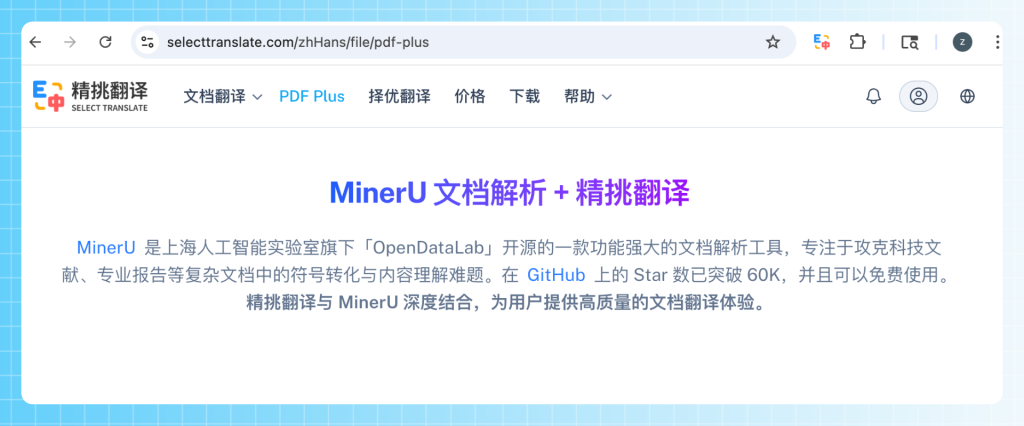
What is PDF Plus?
PDF Plus is an advanced PDF document translation solution launched by SelectTranslate. It is built upon:
- MinerU document parsing capability
- Multimodal OCR (Optical Character Recognition)
- AI translation models
- Complex layout reconstruction technology
It is specifically designed to handle:
- Academic paper PDF translation
- Scientific research literature translation
- Scanned PDF translation
- Professional report translation
- Double-column paper translation
- PDF translation containing formulas
- PDF translation containing tables
Compared to traditional PDF translation tools, PDF Plus places a stronger emphasis on:
- Document structure restoration
- Complex element recognition
- Bilingual reading experience
- Editable translated text
- Export usability
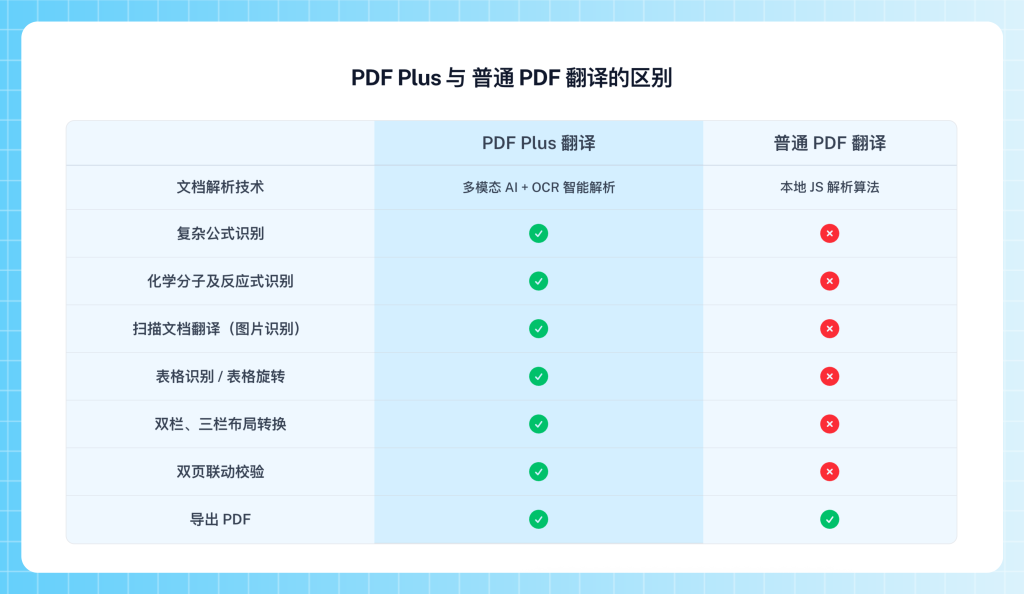
This level of capability is especially critical for High-quality PDF translation.
What is MinerU?
MinerU is an open-source document parsing tool from OpenDataLab, a subsidiary of the Shanghai Artificial Intelligence Laboratory. Currently, MinerU has become one of the most popular document parsing projects globally, boasting over 62K Stars on GitHub.
The core capabilities of MinerU include:
- OCR text recognition
- Scientific document structure parsing
- Mathematical formula recognition
- Table structure recovery
- Image area detection
- Multi-column layout analysis
- PDF content reconstruction
Its primary objective is to solve problems in complex scientific literature regarding:
- Content understanding
- Symbol parsing
- Structure extraction
- Document reconstruction
Therefore, MinerU is ideally suited for:
- PDF translation
- PDF document parsing
- Academic paper translation
- Scientific research data processing
- Scanned document recognition
- Multi-column document reading
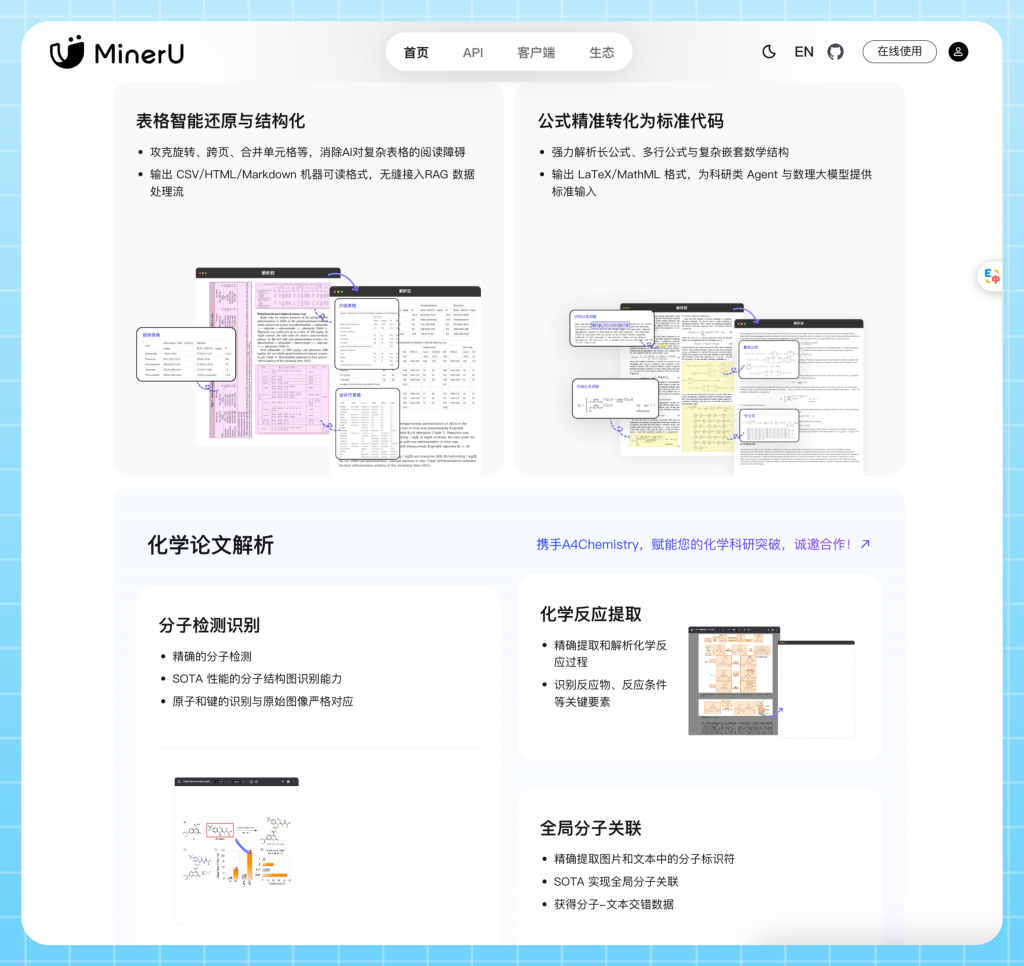
SelectTranslate PDF Plus is precisely built upon the MinerU document parsing capability to achieve a comprehensive upgrade in the complex PDF document translation experience.
Core Capabilities of PDF Plus
1. High-Precision Extraction of Complex PDF Elements
The primary challenge of traditional PDF translation is not the “translation” itself, but rather “parsing failure.” This is particularly true for the following content:
- Mathematical formulas
- LaTeX expressions
- Chemical molecular structures
- Tables
- Image captions
- Figure notes
- Multi-column layouts
Many PDF translation tools will directly output garbled characters when encountering these elements. SelectTranslate PDF Plus leverages MinerU combined with Multimodal AI to achieve high-precision recognition of complex elements.
It supports:
- Mathematical formula preservation
- Table structure recovery
- Image area identification
- Chemical formula parsing
- Academic symbol restoration
After translation:
- The original structure is preserved as much as possible.
- The reading sequence becomes more logical.
- The exported PDF closely resembles the original document layout.
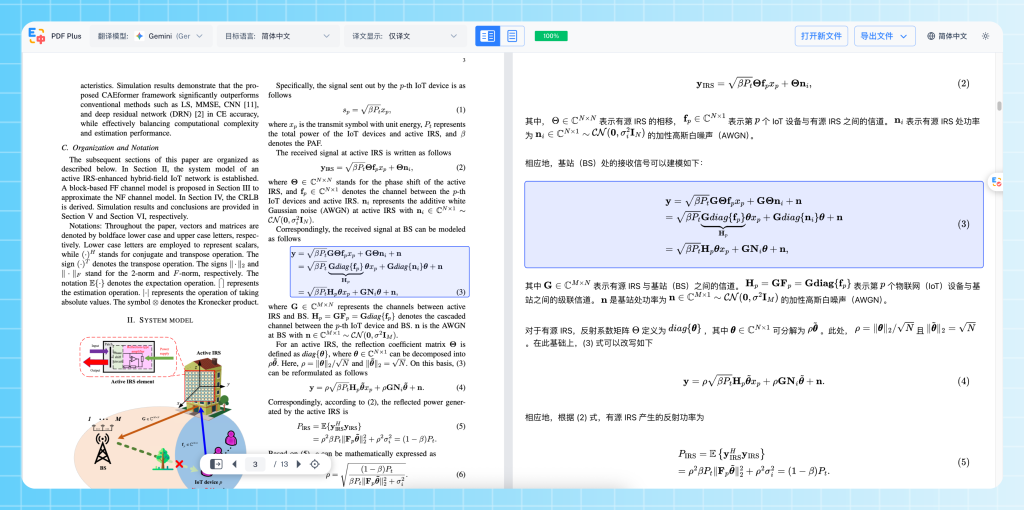
This level of precision is particularly vital for the Academic paper PDF translation scenario.
2. Scanned PDF Translation
Scanned PDFs have long been the “dead zone” for traditional PDF translation tools. This includes:
- Mobile-captured scans
- Legacy literature
- Image-based PDFs
- Photocopied papers
- PDFs without a text layer
While standard PDF translation tools usually fail to recognize these, SelectTranslate PDF Plus integrates OCR and structural recognition capabilities to perform:
- Text recognition
- Page analysis
- Content reconstruction
- AI translation
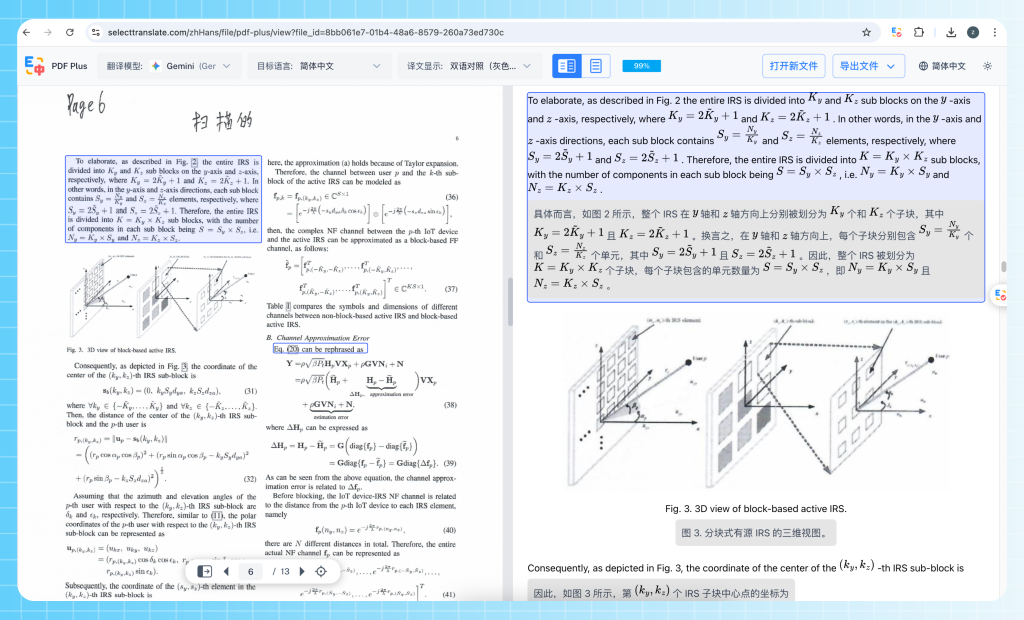
Even for blurred scans, it achieves High-quality PDF translation. This capability is particularly suitable for:
- Historical document translation
- Scanned paper translation
- Paper report digitization
- Image PDF translation
3. Automatic Double-Column to Single-Column Conversion
A vast number of academic papers utilize:
- Double-column layouts
- Triple-column layouts
Traditional PDF translation often results in:
- Disrupted reading order
- Crosstalk between left and right columns
- Content jumping
- Broken logic
SelectTranslate PDF Plus automatically identifies:
- Double-column structures
- Reading sequence
- Page regions
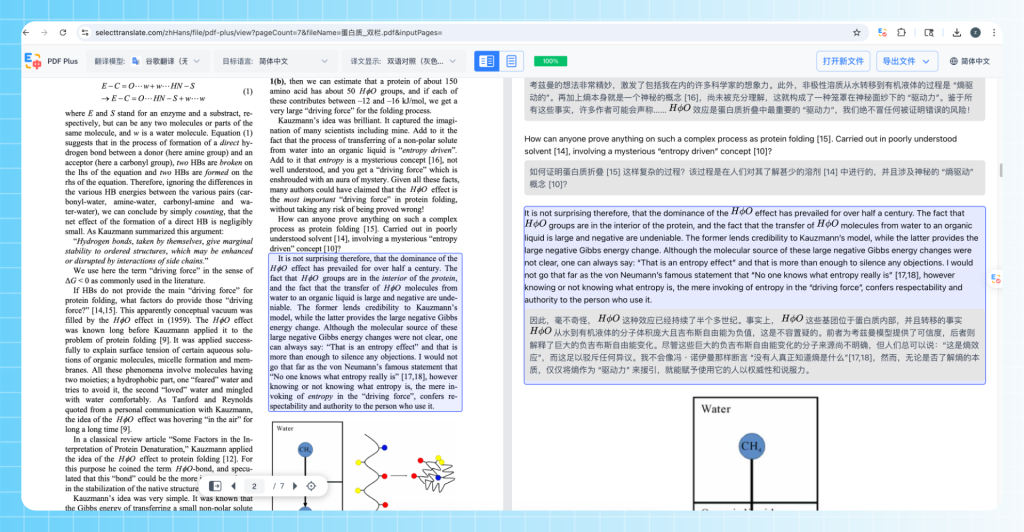
It then automatically converts them into a single-column mode better suited for reading. This ensures:
- PDF translation results are more continuous.
- Bilingual reading feels more natural.
- Academic paper reading efficiency is significantly improved.
4. Editable Translated Text
Most PDF translation tools provide “read-only” translations. However, professional users often need to:
- Correct professional terminology
- Modify industry-specific expressions
- Adjust tone
- Proofread AI translation results
SelectTranslate PDF Plus offers:
- Direct editing of translated text
- Real-time modification
- Content correction
This is especially suitable for Medical PDF translation, Legal PDF translation, Financial report translation, and Engineering technical document translation, allowing users to finalize the document directly.
5. Linked Bilingual Dual-Panel Reading
SelectTranslate PDF Plus supports:
- Side-by-side original and translated text
- Bilingual linked positioning
- Synchronized jumping between source and target
Clicking the source text automatically locates the corresponding translation, and clicking the translation automatically locates the source. This provides a significant experience upgrade for High-quality PDF translation tools in areas such as:
- Academic proofreading
- Terminology verification
- Professional reading
- Bilingual learning
6. Support for Watermark-Free PDF Export
Many PDF translation tools can translate content but cannot export usable files. SelectTranslate PDF Plus supports:
- PDF export
- HTML export
Furthermore, it supports:
- Watermark-free output
- Exporting after modification
- Final version generation
This significantly reduces the need for secondary processing workflows.
Free Document Translation: Supporting Multiple File Formats
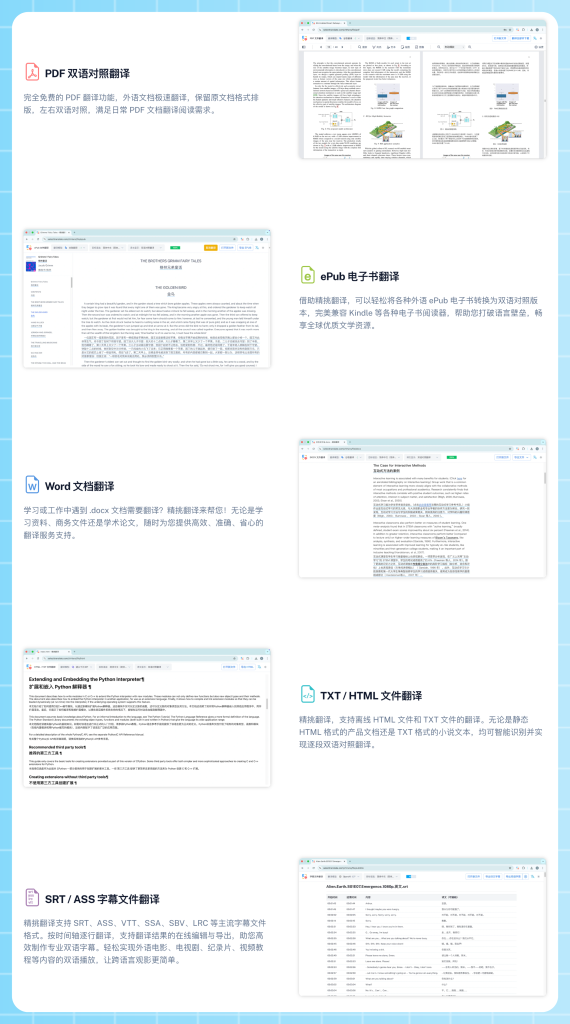
In addition to PDF Plus, SelectTranslate also offers the “Document Translation” function. This feature focuses on:
- Free document translation
- High-speed translation
- All-format document translation
- Local parsing
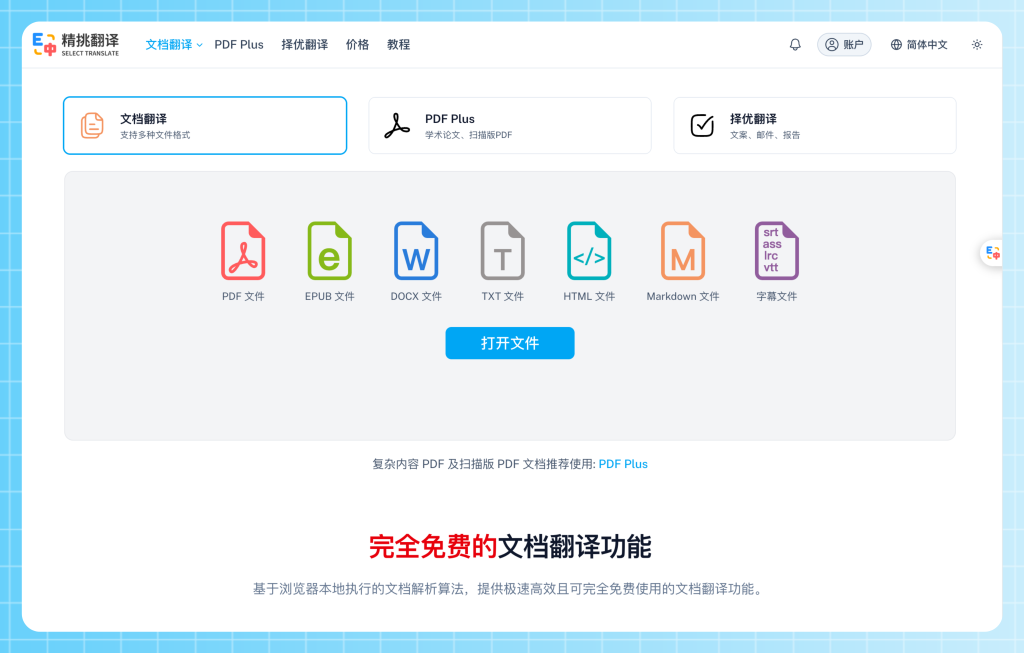
Which formats are supported by Free document translation?
Currently, it supports:
- PDF, Word, TXT, HTML, Markdown, ePub, SRT, ASS
It is applicable for:
- E-book translation, Subtitle translation, Word document translation, Markdown document translation, and Web file translation.It represents a typical “All-format document translation” solution.
Local Parsing: Enhancing Speed and Privacy
Traditional online PDF translation usually requires uploading to a server, queuing for analysis, and cloud processing. SelectTranslate’s “Document Translation” function utilizes browser-based local parsing technology.
Key features include:
- Faster translation speeds
- No long upload times
- Local document processing
- Enhanced suitability for daily use
The efficiency advantage is evident for Daily PDF translation, E-book translation, and Subtitle translation.
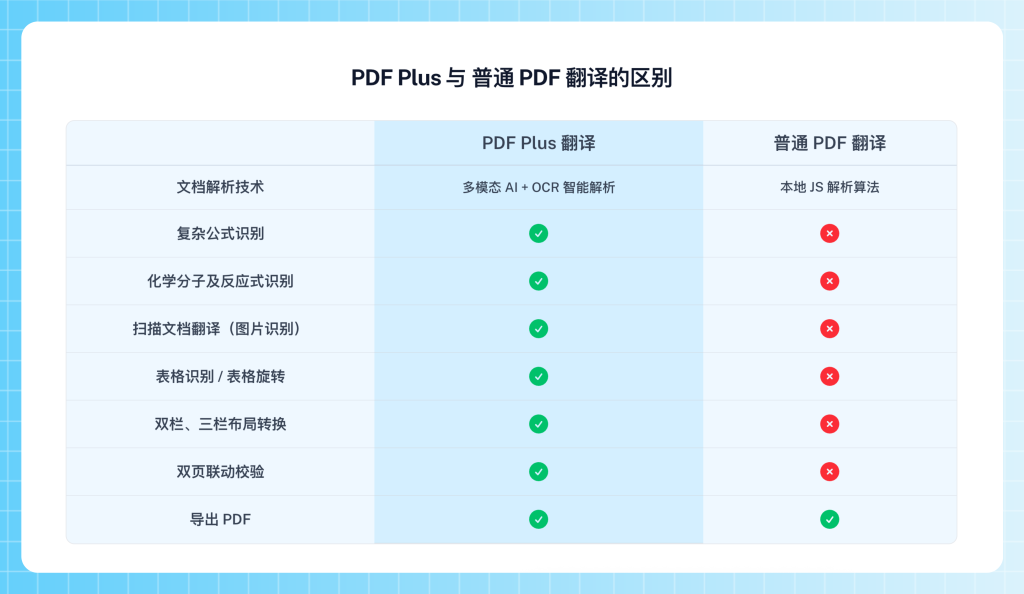
Differences Between PDF Plus and Standard Document Translation
| Feature | Document Translation | PDF Plus |
| Is it free? | Yes | Provides free credits |
| Translation Speed | Extremely Fast | Fast |
| Suitable Scenarios | Daily documents | Professional PDFs |
| Scanned PDF Support | Basic | Strong |
| Formula Recognition | Average | Strong |
| Table Parsing | Average | Strong |
| Multi-column Papers | Average | Strong |
| Bilingual Linkage | Supported | Supported |
| Text Editing | Supported | Supported |
| Export Capability | Supported | Supported |
Who is PDF Plus for?
PDF Plus is specifically designed for:
- Academic Research Users: For SCI paper translation, arXiv paper translation, IEEE literature translation, and Academic PDF translation.
- Finance Industry Users: For Financial report translation, Industry report translation, and Investment analysis PDF translation.
- Medical Industry Users: For Medical paper translation, Clinical report translation, and Drug documentation translation.
- Engineering & Technical Users: For Technical manual translation, API documentation translation, and Engineering PDF translation.
Why is PDF Translation Becoming Increasingly Important?
With globalized scientific research, the development of AI technology, and the growing demand for overseas information retrieval, PDF document translation has become a high-frequency requirement. A vast amount of content, such as foreign papers, overseas industry reports, international standard documents, and technical white papers, exists in PDF format.
Therefore, High-quality PDF translation, Free document translation, and All-format document translation have become essential infrastructure for content production and knowledge acquisition.
Summary
If you only need Daily document translation, E-book translation, or Subtitle translation, we recommend using SelectTranslate “Document Translation” for its Free document translation, high-speed processing, and local parsing.
However, if you need to process Academic papers, Scientific literature, Scanned PDFs, PDFs containing formulas, or Multi-column professional documents, PDF Plus is the superior choice. Its core advantages include MinerU document parsing, High-quality PDF translation, complex element recognition, linked bilingual reading, and watermark-free PDF export.
When standard PDF translation tools cannot handle complex documents, PDF Plus is the specialized solution for professional scenarios.
Experience it now:
- PDF Plus: https://selecttranslate.com/zhHans/pdf-plus
- Document Translation: https://selecttranslate.com/zhHans/file