

When more and more players start using Steam to discover indie games, trending overseas titles, and community content, one question has become increasingly common:
How to Translate Steam into Chinese?
Many users search for keywords such as “Steam Chinese Version,” “Steam Translation,” and “Steam Chinese Settings.” However, what they actually want to solve is usually not a client language issue. Instead, they are trying to address problems such as:
- Unable to understand Steam Store pages
- Game descriptions and details are only available in English
- Review sections are filled with foreign languages
- Community posts are difficult to read
- Not knowing how to communicate with overseas players
- Difficulty quickly identifying whether a game supports Chinese
Steam has become one of the largest gaming platforms in the world, but language barriers still remain a major obstacle affecting the overall gaming experience.
Now, SelectTranslate supports Steam client translation capabilities, effectively adding an AI-powered Chinese localization enhancement layer directly to the Steam client.
SelectTranslate Official website: https://selecttranslate.com/zhHans
Install SelectTranslate: https://selecttranslate.com/zhHans/download
SelectTranslate User Guide: https://selecttranslate.com/zhHans/docs/start/quick-start
Why Is Steam Chinese Version Still Difficult to Understand?
Many users think:
“I’ve already switched to Steam Chinese Version, so why is so much content still unreadable?”
The reason is simple:
Steam’s official Chinese support usually only covers the basic client interface, including menus, settings, feature entries, and some official content.
However, much of the content users actually browse is not automatically translated.
Examples include:
Steam Store Pages
This includes:
- Game descriptions
- Developer notes
- Update logs
- DLC descriptions
- System requirements
Many indie developers even provide content only in English.
Steam Review Sections
Steam reviews often function as a massive global chatroom where multiple languages appear simultaneously, including:
- English
- Japanese
- Korean
- Russian
- Spanish
When you simply want to know:
“Is this game worth buying?”
You may discover that the review section feels like an alien language battlefield.
Steam Community Hub
Community hubs often contain:
- Player guides
- Mod sharing
- Workshop instructions
- Discussion threads
- Troubleshooting information
Without a Steam translation tool, accessing information efficiently becomes extremely difficult.
How to Translate Steam into Chinese?
Currently, there are three main approaches.
Method 1: Use Steam Official Language Settings
Advantages:
- Easy to configure
- Supported directly by Steam
Disadvantages:
- Only translates the basic interface
- Cannot translate community content
- Cannot translate reviews
- Cannot translate user-generated input content
Method 2: Copy Content into Third-Party Translation Tools
The process usually becomes:
Copy → Switch windows → Paste → Translate → Return to Steam
Problems:
- Low efficiency
- Interrupts browsing experience
- No real-time translation
Method 3: Use SelectTranslate for Steam Translation (Recommended)
SelectTranslate enables AI translation directly inside the Steam client.
No repeated copy-pasting.
No leaving Steam.
No manually switching between pages.
How SelectTranslate Solves Steam Translation Pain Points
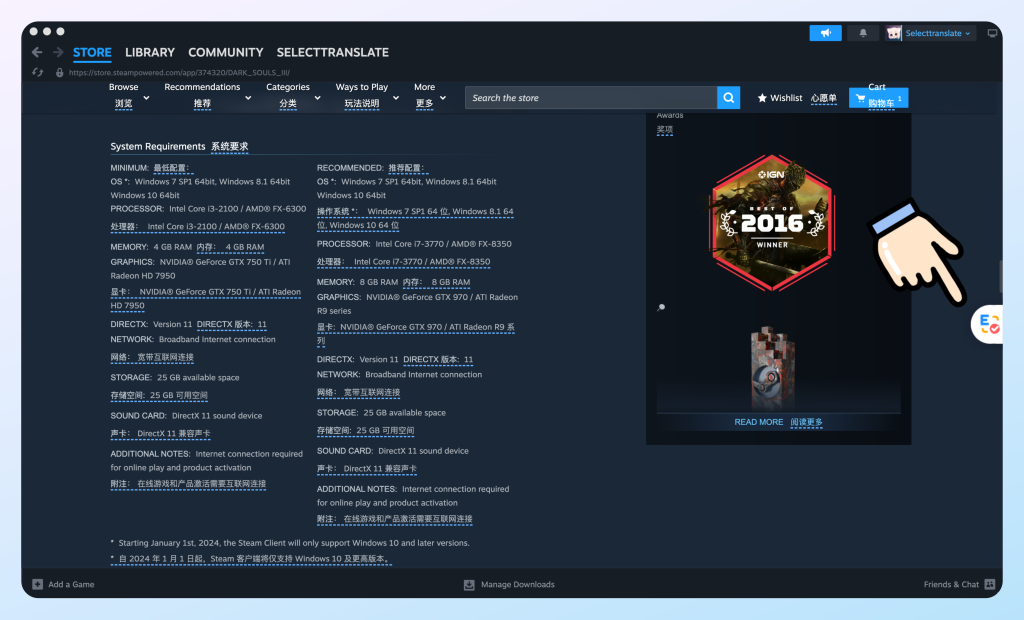
1. One-Click Translation for Steam Game Detail Pages
When browsing overseas games:
Previously, users had to guess the meaning of game backgrounds, world settings, update notes, and system requirements.
With SelectTranslate:
Click once to translate the entire page.
All game information becomes instantly understandable.
Applicable scenarios:
- Steam game detail page translation
- Steam Store page translation
- Steam game description translation
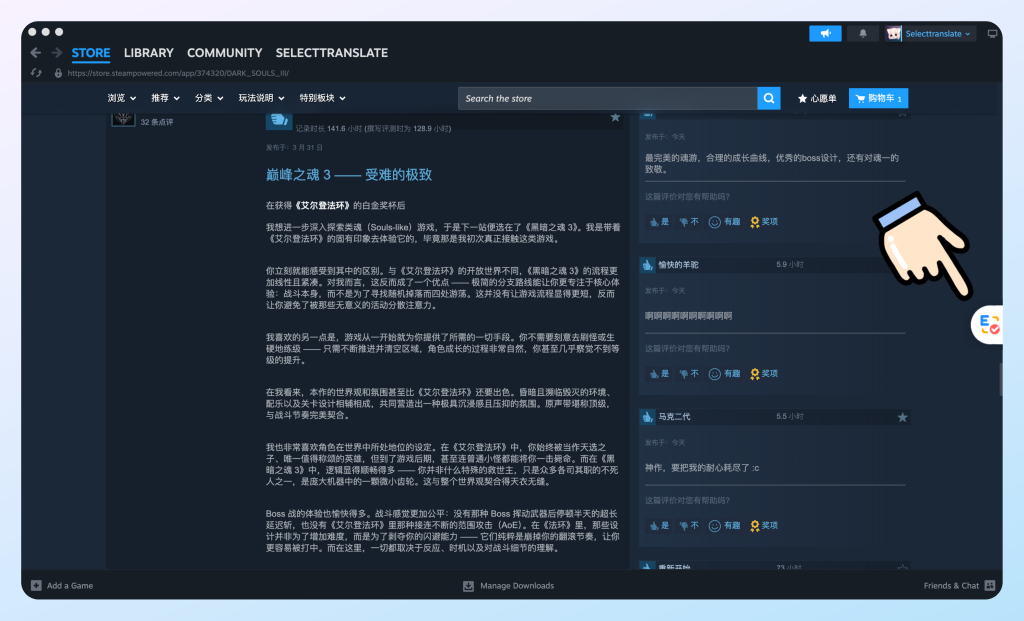
2. Steam Review Translation
Before purchasing a game, many players enjoy reading:
“The negative review section.”
Because negative reviews are often more authentic than official marketing descriptions.
Previously, if you saw:
“Amazing combat system but terrible optimization.”
You had to open another translation application.
Now, SelectTranslate performs Steam review translation directly, without switching pages or copying text.
3. Steam Input Translation
This is a scenario many Steam translation tools fail to support.
Many users’ real problem is not:
“How do I understand what others are saying?”
Instead, it is:
“How do I communicate with them?”
For example, you want to say:
“This Mod is excellent.”
But what comes to mind is:
“This Mod good…”
With SelectTranslate Input Translation:
Simply type in Chinese:
“This Mod is extremely well made.”
The system automatically generates natural expressions.
Applicable scenarios:
- Steam community chats
- Review replies
- Player communication
- Steam Workshop discussions
Steam Client SelectTranslate Installation Tutorial
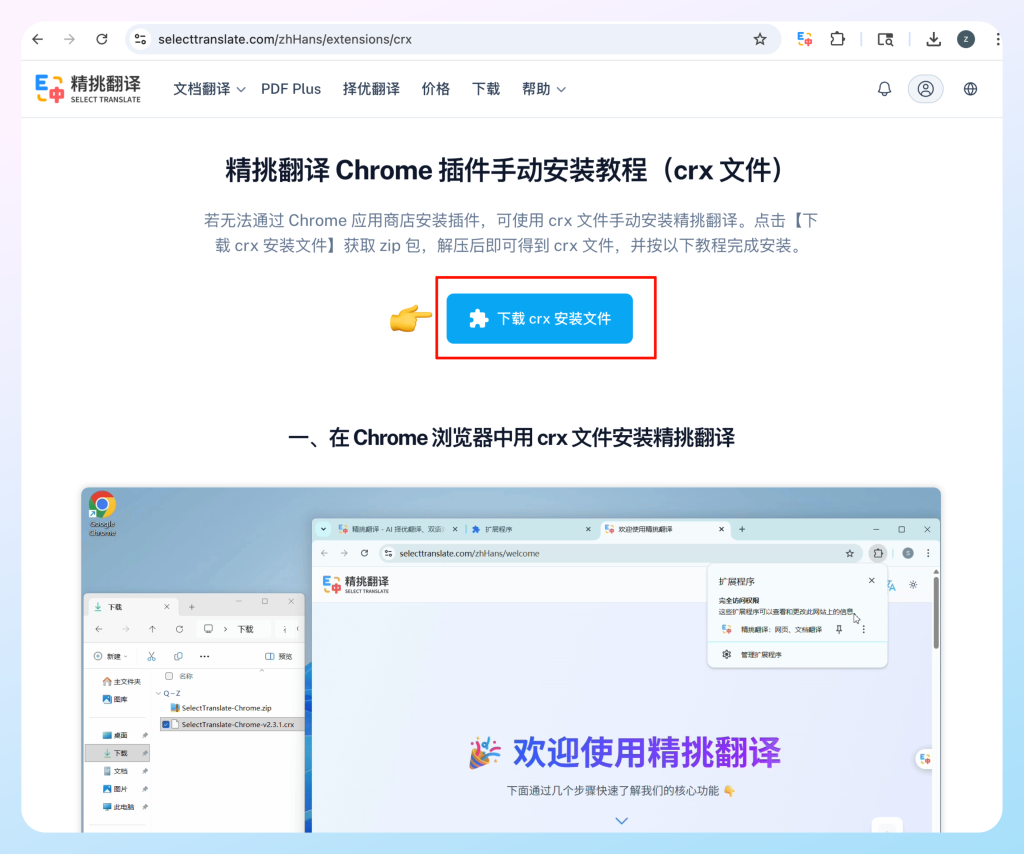
Step 1: Download SelectTranslate
Visit the SelectTranslate Official website and download the extension file:
SelectTranslate Download Page
Download the ZIP file and extract it.
Step 2: Open a New Steam Page
Inside any game page:
Right-click:
Open link in new tab
Step 3: Open the Extension Page
Enter the following into the address bar:
chrome://extensions
This opens the extension management page.
Step 4: Enable Developer Mode
Turn on:
Developer Mode
Then:
Drag the extracted CRX file into the page.
Installation will complete automatically.
Step 5: Refresh Steam
Return to the Steam homepage and refresh the page.
If a SelectTranslate floating icon appears on the right side:
The installation has succeeded.
Log in to your account and start using it.

What Content Does Steam Translation Support?
SelectTranslate currently supports:
- Steam Store page translation
- Steam game detail page translation
- Steam review translation
- Steam community translation
- Steam input translation
- AI bilingual reading
- Multi-language translation
Current limitations:
❌ AI translation for Steam Store video subtitles is not yet supported
❌ In-game text after launching games is outside the supported scope
FAQ About How to Translate Steam into Chinese
What Is the Difference Between Steam Chinese Version and Steam Translation?
Steam Chinese Version usually refers only to the client interface language.
Steam Translation includes:
- Review translation
- Community translation
- Game detail page translation
- Input translation
Does Steam Have Built-In Translation Features?
Steam currently does not provide complete real-time translation capabilities.
Especially for:
- Reviews
- Community content
- User input content
Additional tools are usually required.
How Can You Achieve a Complete Chinese Experience on Steam?
If you want an experience close to a fully localized Steam Chinese Version, combining:
Steam Client Chinese Settings + SelectTranslate
is recommended.
This combination can effectively cover:
- Browsing
- Reading
- Reviews
- Input
- Community interaction
Conclusion: Steam Chinese Version Is More Than Just a Chinese Interface — It Is a Complete Steam Translation Experience
For most players, the real question is not:
“Does Steam support Chinese?”
Instead, it is:
“How can Steam become a completely Chinese-speaking environment?”
SelectTranslate fills the gaps left by Steam’s native translation capabilities:
- Steam game detail translation
- Steam review translation
- Steam input translation
- Steam community translation
When browsing, reading, and communication no longer have language barriers, Steam finally delivers what users expect from a truly complete Steam Chinese Version experience.