4.9 / 5.0
Featured extension on ChromeFree AI Translator
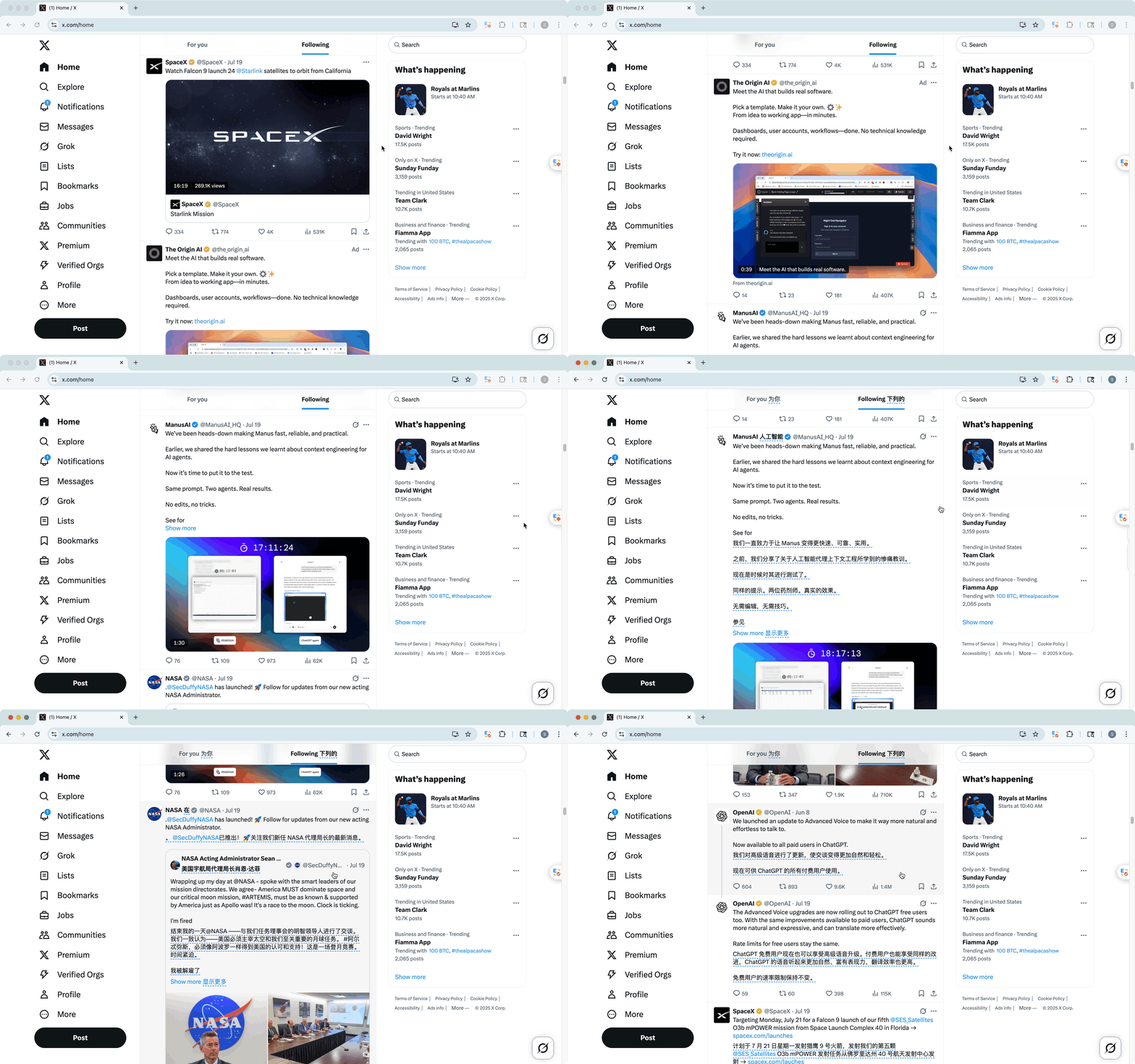
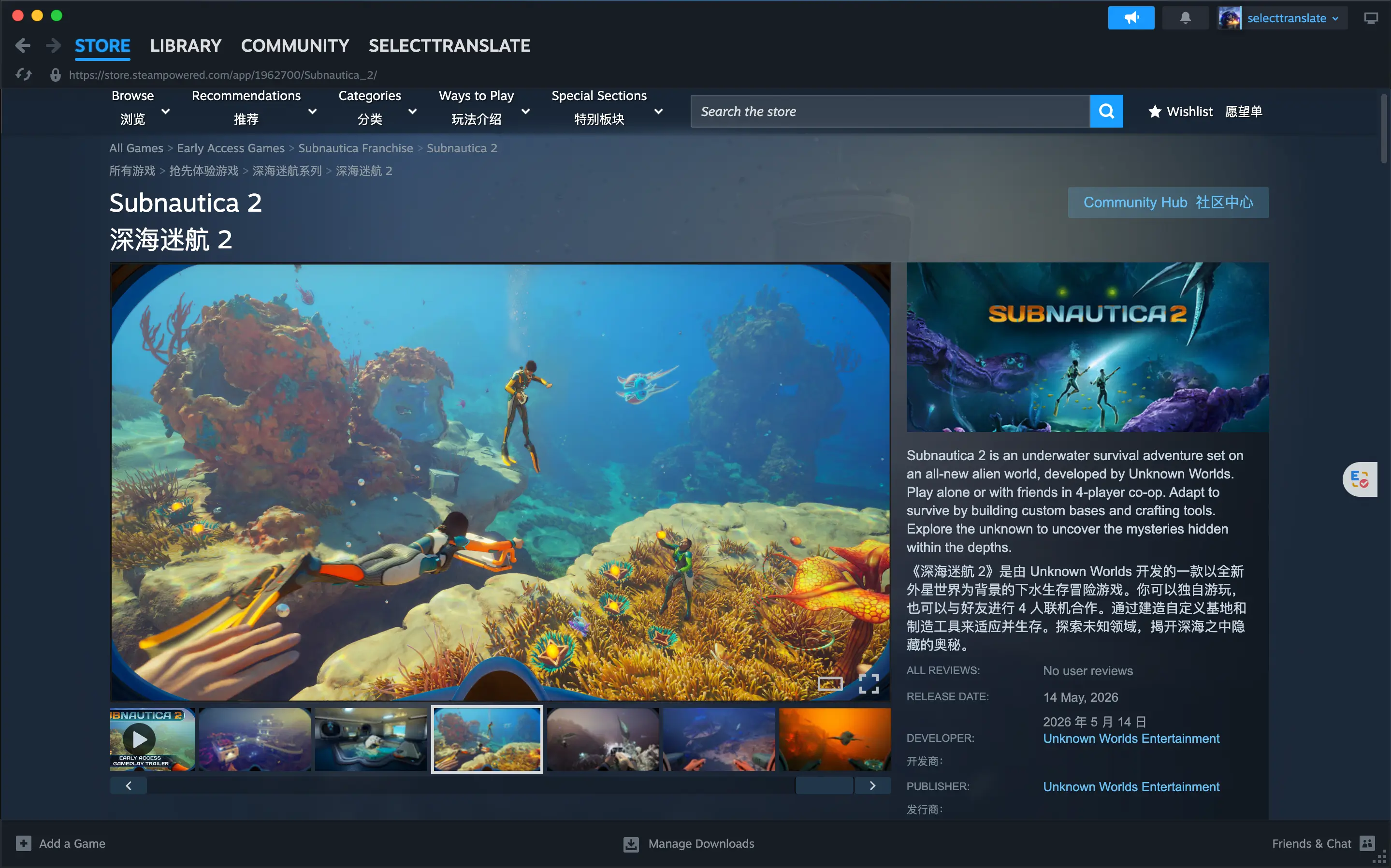
SelectTranslate supports bilingual webpage translation, PDF document translation, YouTube/Netflix subtitle translation, image/comic translation, Zoom/Teams/Meet online meeting translation, and ePub eBook translation. It also offers practical capabilities such as optimal translation, input translation, text selection translation, and hover translation. Powered by 20+ top AI models like GPT, DeepSeek, and Gemini, supporting 100+ languages to help you break down language barriers and unlock seamless bilingual reading anytime.
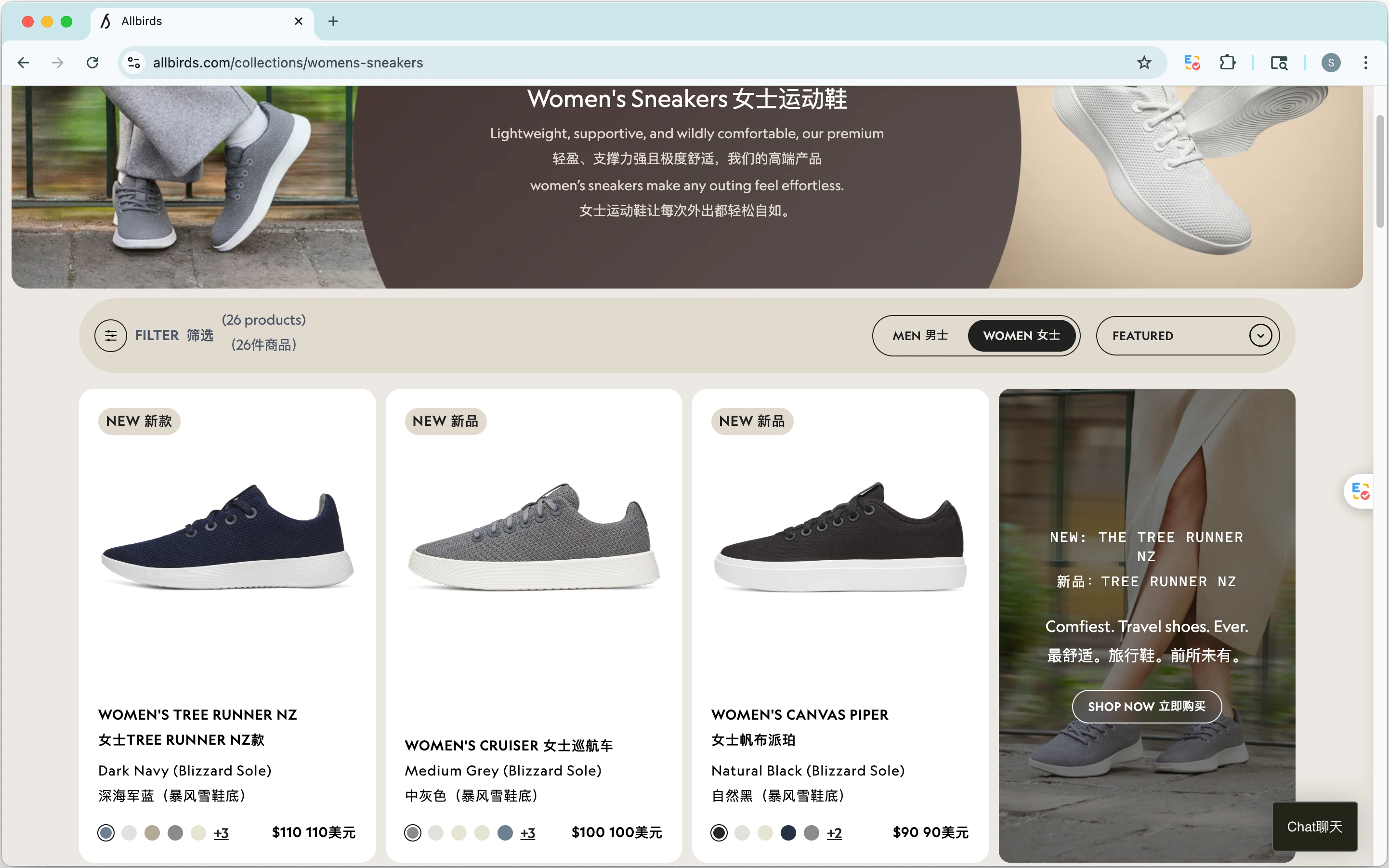
AI bilingual webpage translation smoothly breaks down language barriers, so you can read foreign-language content with ease and efficiency.
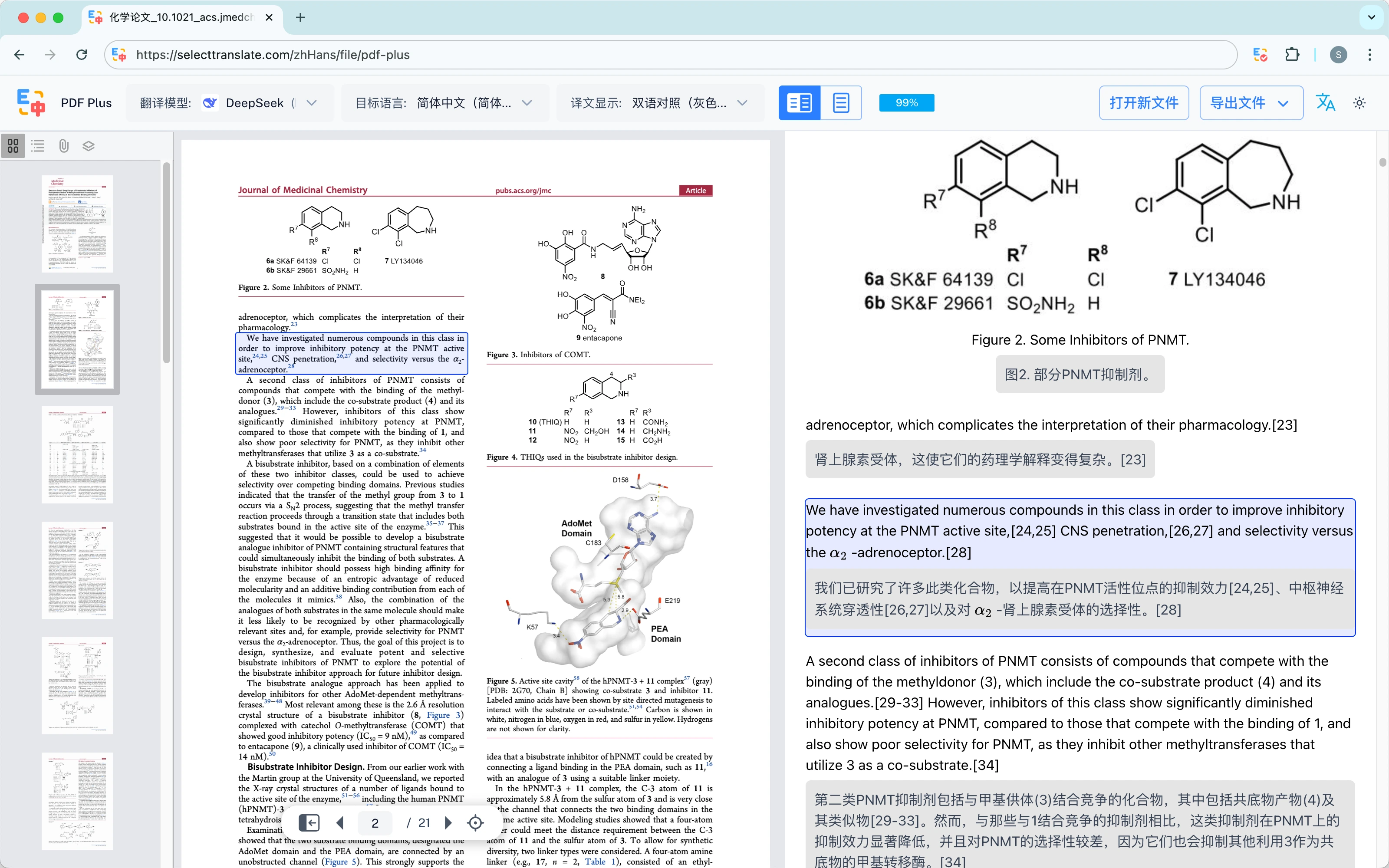
Document Translation
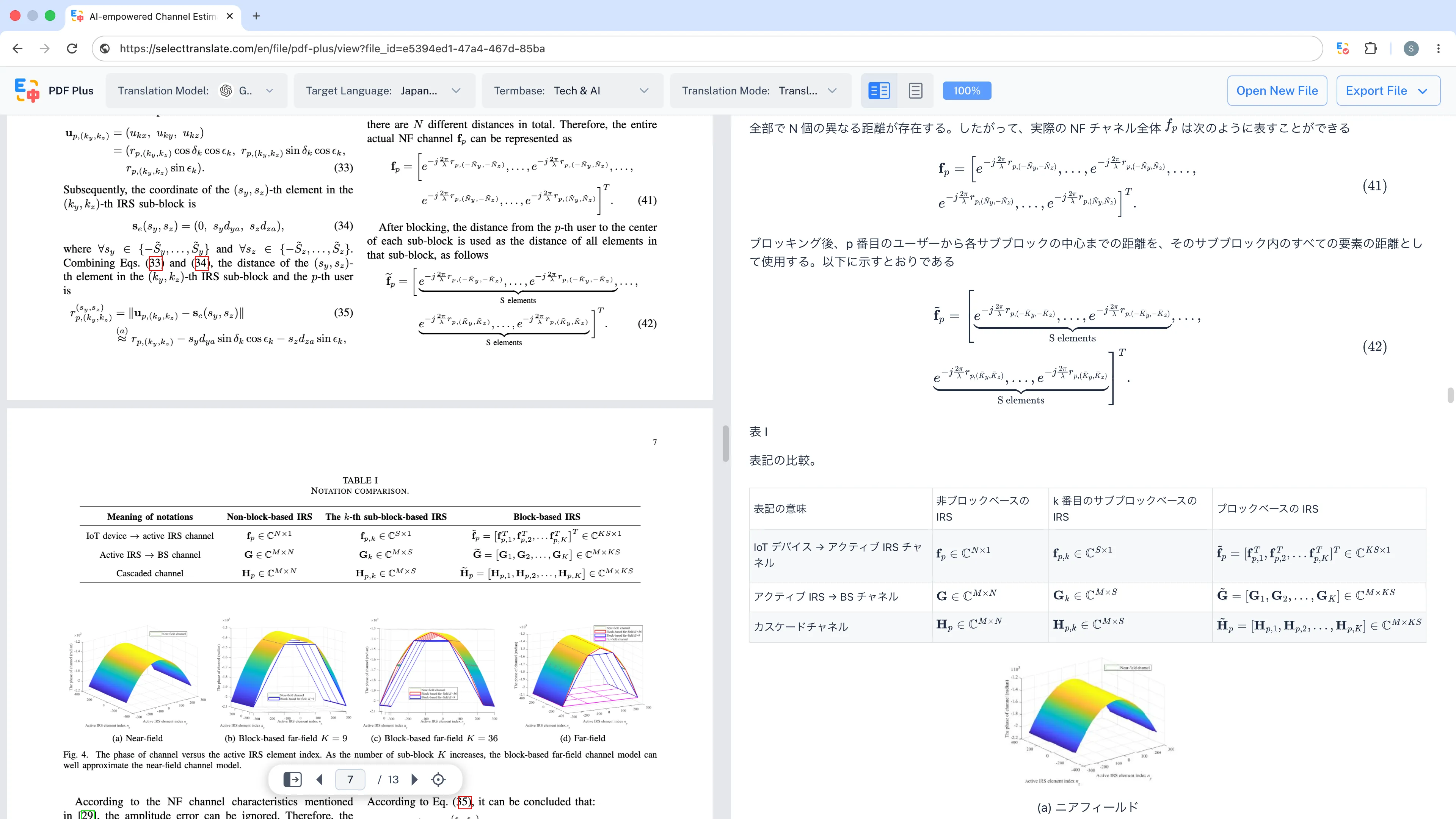
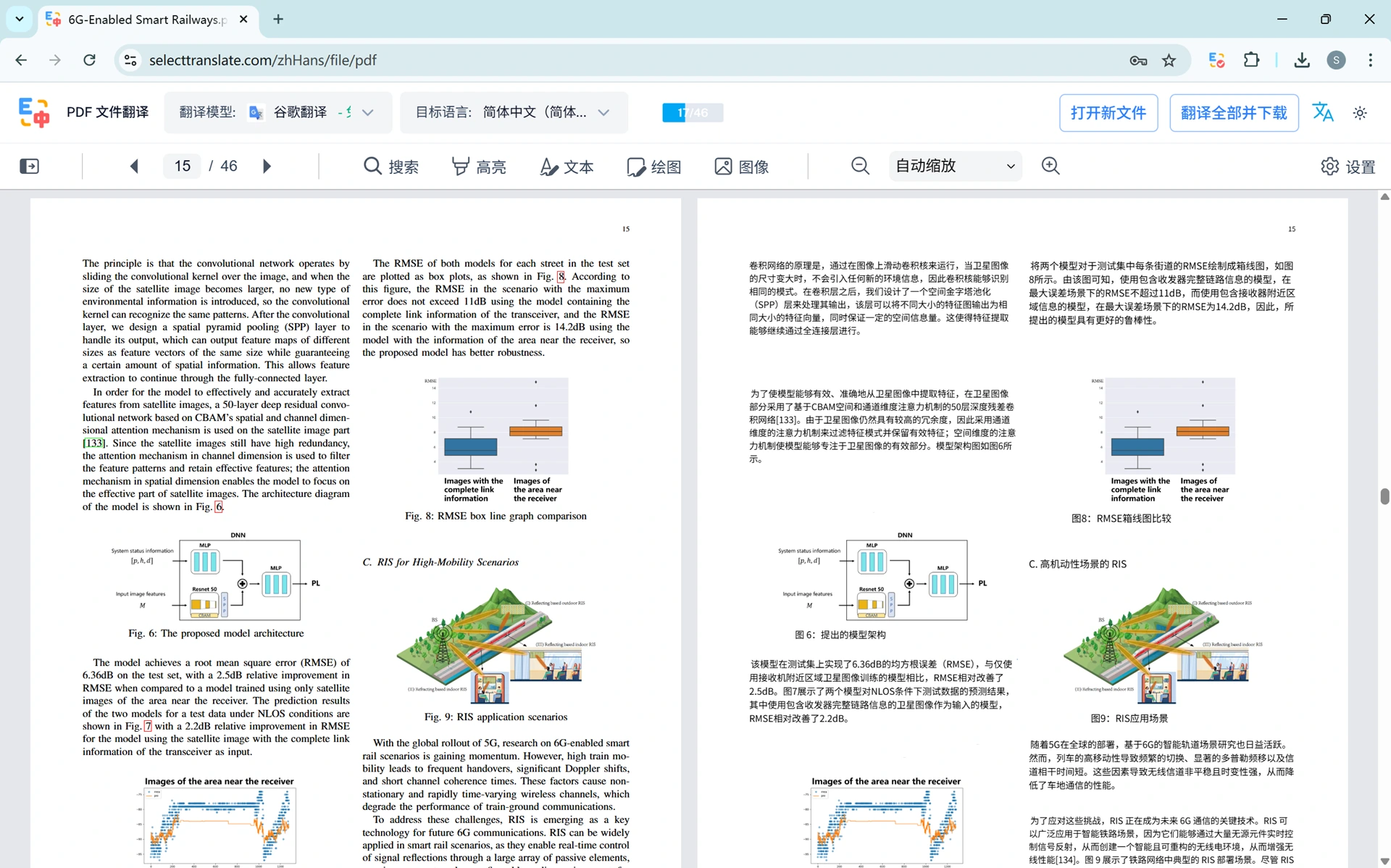
Provides free document translation with support for PDF, ePub, DOCX, HTML, TXT, Markdown, SRT, and ASS formats to meet your daily translation needs.
- Local document parsing for ultra-fast translation.
- Preserves the original document’s formatting and layout.
- Supports translation editing and file export.
Online Meeting Translation
Supports real‑time translation in Zoom, Microsoft Teams, and Google Meet to make cross‑language communication smoother and more efficient.
- Subtitle Translation: Real-time speech translation with bilingual subtitles.
- Message Translation: Displays incoming chat messages in bilingual form immediately.
- Input Translation: Translate your typed message into the recipient’s language with one click.
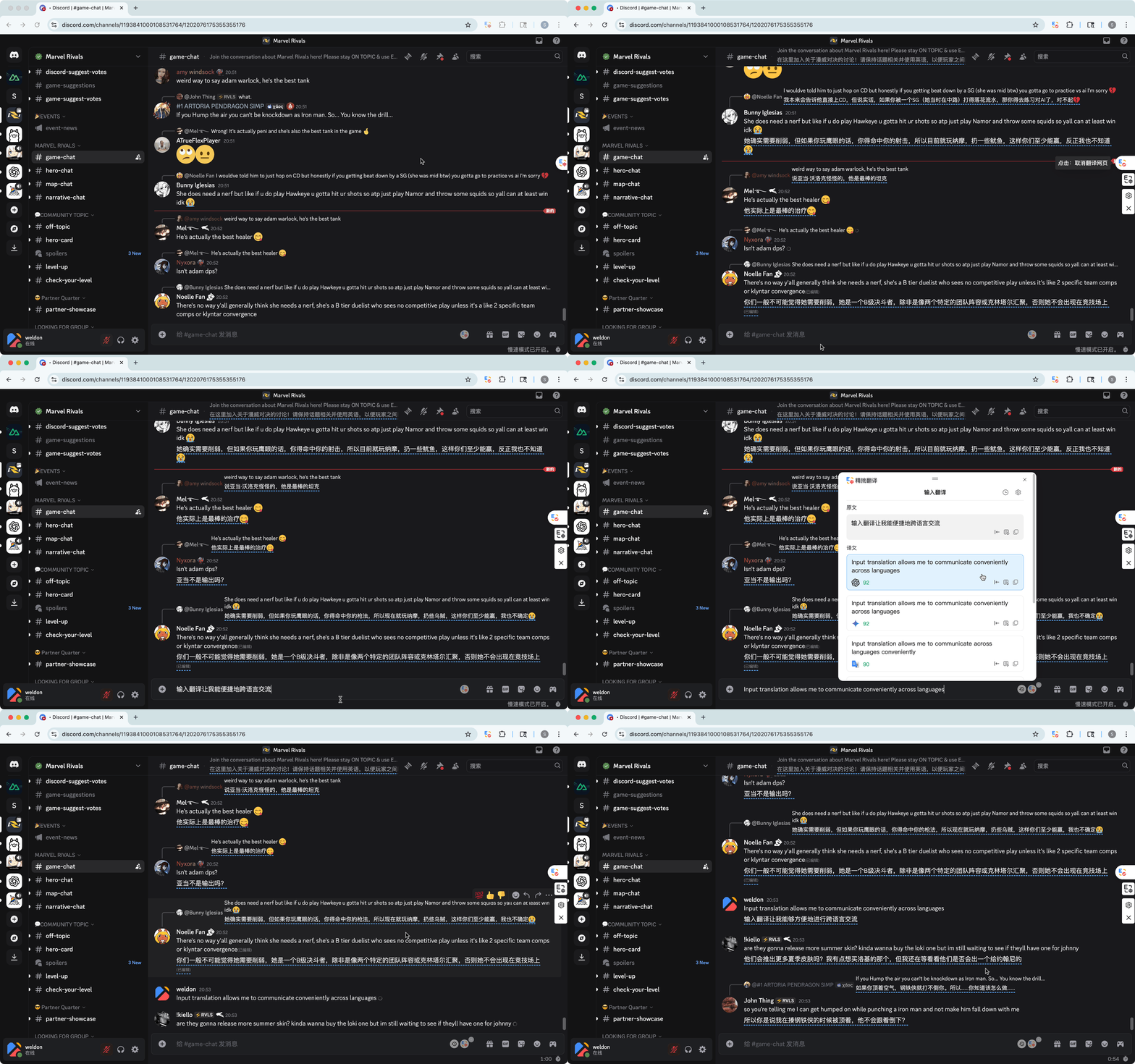
Input Translation
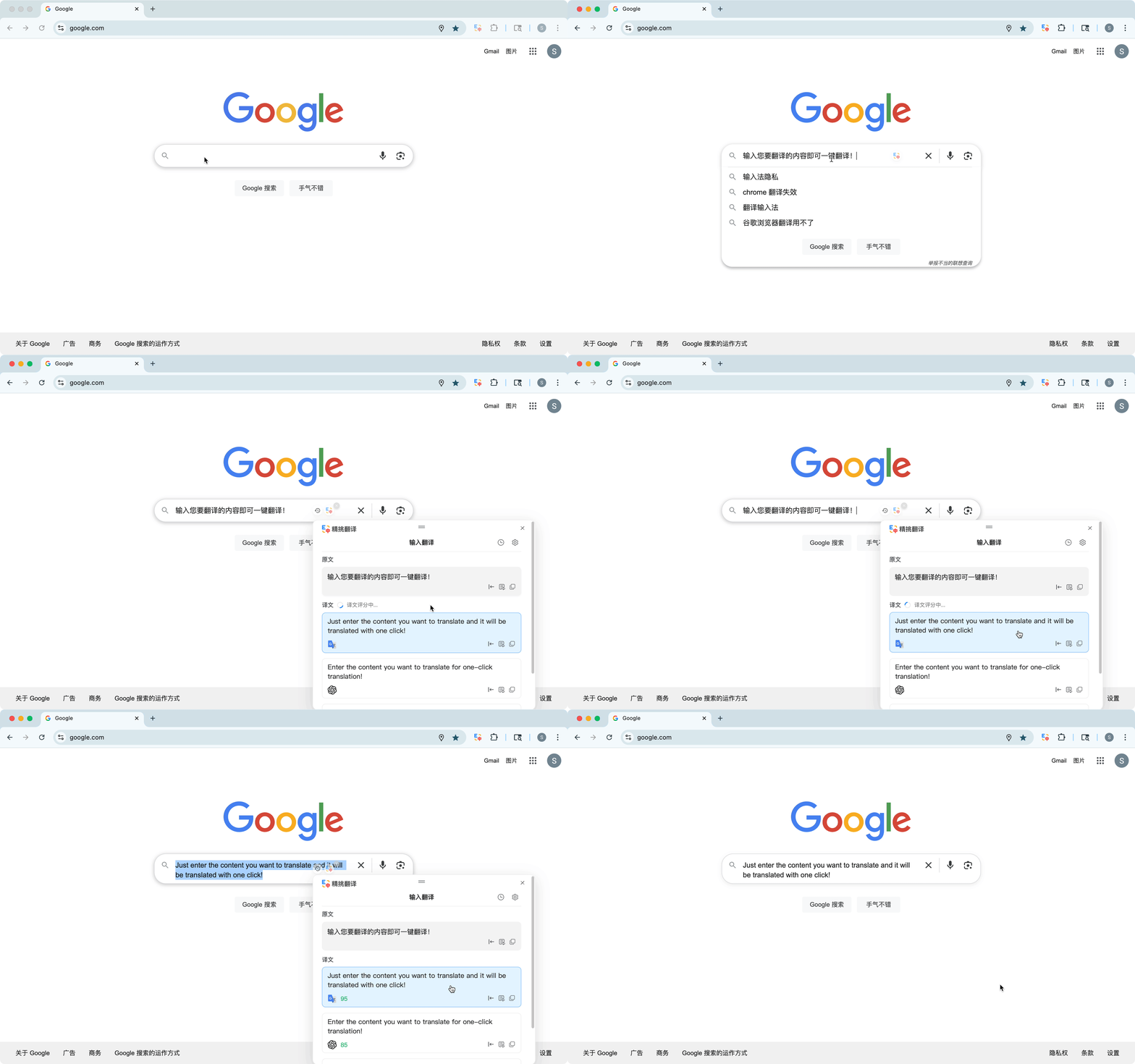
Simply type text into webpage input fields for quick translation. Works seamlessly across Google, Gmail, Reddit, Twitter, Discord, GitHub, and many other online input scenarios, significantly improving cross‑language communication and writing efficiency.
- Direct input integration: Skip the copying, switching, and pasting required by traditional translation tools.
- Chat translation: Fast, single‑model translation for quicker responses.
- Email translation: Multi‑model, best‑of‑output translation for higher accuracy and reliability.
Hover Translation
Hover over any text paragraph on the webpage, and the corresponding translation will be displayed immediately after the original paragraph. Bilingual comparison and on-demand translation help you learn foreign languages more flexibly.
- Paragraph Translation: Translates only the paragraph you hover over.
- Area Translation: Translates all paragraphs within the hovered area.
- Customize the hover‑translation shortcut to fit your personal preferences.

Selection Translation
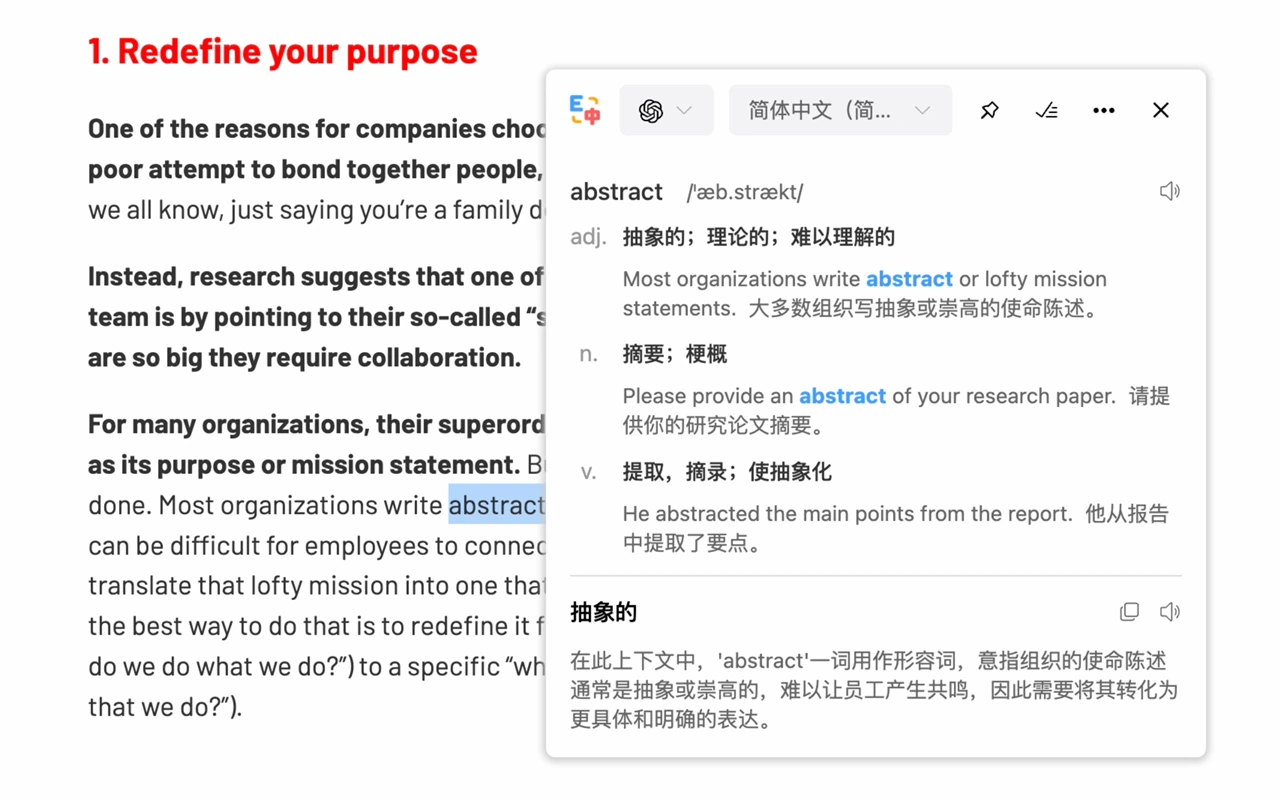
Simply highlight words or text to translate, giving you a convenient and lightweight translation experience.
- Word translation: part of speech, phonetic symbols, pronunciation, example sentences, comprehensive learning.
- Provide detailed translation explanations based on the word’s contextual usage.
- Switch translation models and target languages as needed.
Integrate the world's top-tier AI translation models


'%20fill-rule='nonzero'%3e%3c/path%3e%3cdefs%3e%3clinearGradient%20id='lobe-icons-qwen-fill'%20x1='0%25'%20x2='100%25'%20y1='0%25'%20y2='0%25'%3e%3cstop%20offset='0%25'%20stop-color='%236336E7'%20stop-opacity='.84'%3e%3c/stop%3e%3cstop%20offset='100%25'%20stop-color='%236F69F7'%20stop-opacity='.84'%3e%3c/stop%3e%3c/linearGradient%3e%3c/defs%3e%3c/svg%3e)
'%3e%3cpath%20d='M14.955%2036.8266C15.3608%2028.0069%2019.3784%2022.7246%2020.9475%2020.9863C13.2844%2025.8223%208.19823%2034.2835%206.00684%2040.5127V43.1437C6.00684%2050.3537%2012.4119%2056.2041%2020.3117%2056.2041C22.1379%2056.2041%2023.8761%2055.8863%2025.4859%2055.3181C26.3178%2055.034%2027.1294%2054.7365%2027.9275%2054.4321C30.0716%2052.3219%2031.8098%2049.9411%2033.2031%2047.398C21.7389%2053.1132%2014.4613%2047.5671%2014.955%2036.8266Z'%20fill='%231E37FF'/%3e%3cpath%20d='M55.523%2023.9618C52.6756%2021.8448%2045.8647%2018.3142%2038.1407%2017.3809C38.8373%2026.2952%2038.3571%2037.9826%2033.2033%2047.3975C31.81%2049.9406%2030.0785%2052.3146%2027.9277%2054.4316C36.7745%2051.0295%2043.7815%2046.3086%2048.1305%2042.1693C54.7587%2035.8589%2056.01%2029.9949%2056.0303%2026.5184C56.0303%2025.6324%2055.8544%2024.7667%2055.523%2023.9686V23.9618Z'%20fill='%2337E1BE'/%3e%3cpath%20d='M36.0911%204.18544C32.919%201.43944%2028.9082%20-0.204102%2024.5389%20-0.204102C20.1696%20-0.204102%2016.3009%201.38533%2013.1559%204.04341C9.03685%207.52664%206.2976%2012.8563%206%2018.8962V40.5192C8.19139%2034.29%2013.2776%2025.8288%2020.9407%2020.9929C22.1108%2020.2556%2023.3418%2019.5928%2024.6268%2019.045C29.057%2017.1647%2033.7441%2016.8536%2038.1337%2017.3879C37.6129%2010.7326%2036.4495%205.63284%2036.0911%204.18544Z'%20fill='%23A569FF'/%3e%3cpath%20d='M43.1452%2011.4564C42.178%2010.4824%2041.3055%209.60315%2040.6021%208.88622C40.1286%208.38571%2039.6687%207.89874%2039.2223%207.42529C37.3286%205.47062%2036.0908%204.18555%2036.0908%204.18555C36.4493%205.63295%2037.6126%2010.7327%2038.1334%2017.388C45.8642%2018.3214%2052.6683%2021.8519%2055.5157%2023.9689C52.4451%2020.9727%2047.3454%2015.7783%2043.1384%2011.4631L43.1452%2011.4564Z'%20fill='%231E37FF'/%3e%3c/g%3e%3cdefs%3e%3cclipPath%20id='clip0_211_8277'%3e%3crect%20width='56'%20height='56'%20fill='white'/%3e%3c/clipPath%3e%3c/defs%3e%3c/svg%3e)

'%3e%3c/path%3e%3cpath%20d='M18.397%2015.296H7.4a.51.51%200%2000-.347.882l7.066%206.595c.206.192.477.298.758.298h6.226l-2.706-7.775z'%20fill='%230078D4'%3e%3c/path%3e%3cpath%20d='M15.272.857H7.497L0%2023.071h7.775l1.596-4.73%205.068%204.73h6.665l-2.707-7.775h-7.998L15.272.857z'%20fill='url(%23lobe-icons-azure-fill-1)'%3e%3c/path%3e%3cpath%20d='M17.193%201.613a1.11%201.11%200%2000-1.052-.756h-7.81.035c.477%200%20.9.304%201.052.756l6.748%2019.992a1.11%201.11%200%2001-1.052%201.466h-.12%207.895a1.11%201.11%200%20001.052-1.466L17.193%201.613z'%20fill='url(%23lobe-icons-azure-fill-2)'%3e%3c/path%3e%3cdefs%3e%3clinearGradient%20gradientUnits='userSpaceOnUse'%20id='lobe-icons-azure-fill-0'%20x1='8.247'%20x2='1.002'%20y1='1.626'%20y2='23.03'%3e%3cstop%20stop-color='%23114A8B'%3e%3c/stop%3e%3cstop%20offset='1'%20stop-color='%230669BC'%3e%3c/stop%3e%3c/linearGradient%3e%3clinearGradient%20gradientUnits='userSpaceOnUse'%20id='lobe-icons-azure-fill-1'%20x1='14.042'%20x2='12.324'%20y1='15.302'%20y2='15.888'%3e%3cstop%20stop-opacity='.3'%3e%3c/stop%3e%3cstop%20offset='.071'%20stop-opacity='.2'%3e%3c/stop%3e%3cstop%20offset='.321'%20stop-opacity='.1'%3e%3c/stop%3e%3cstop%20offset='.623'%20stop-opacity='.05'%3e%3c/stop%3e%3cstop%20offset='1'%20stop-opacity='0'%3e%3c/stop%3e%3c/linearGradient%3e%3clinearGradient%20gradientUnits='userSpaceOnUse'%20id='lobe-icons-azure-fill-2'%20x1='12.841'%20x2='20.793'%20y1='1.626'%20y2='22.814'%3e%3cstop%20stop-color='%233CCBF4'%3e%3c/stop%3e%3cstop%20offset='1'%20stop-color='%232892DF'%3e%3c/stop%3e%3c/linearGradient%3e%3c/defs%3e%3c/svg%3e)


'%20fill-rule='nonzero'%3e%3c/path%3e%3c/svg%3e)


Application scenarios