
Facebook is one of the world’s biggest social platforms, connecting people across countries, languages, and cultures. You may follow creators from the US, join a Spanish-speaking community, communicate with customers in Europe, or participate in discussions with people from completely different linguistic backgrounds.
The problem is that international communication can become frustrating when every post, comment, or message requires a separate translation step.
Facebook already offers built-in translation for posts and comments. Depending on your language settings and the content, you can click “See Translation” to translate a post or comment into your preferred language.
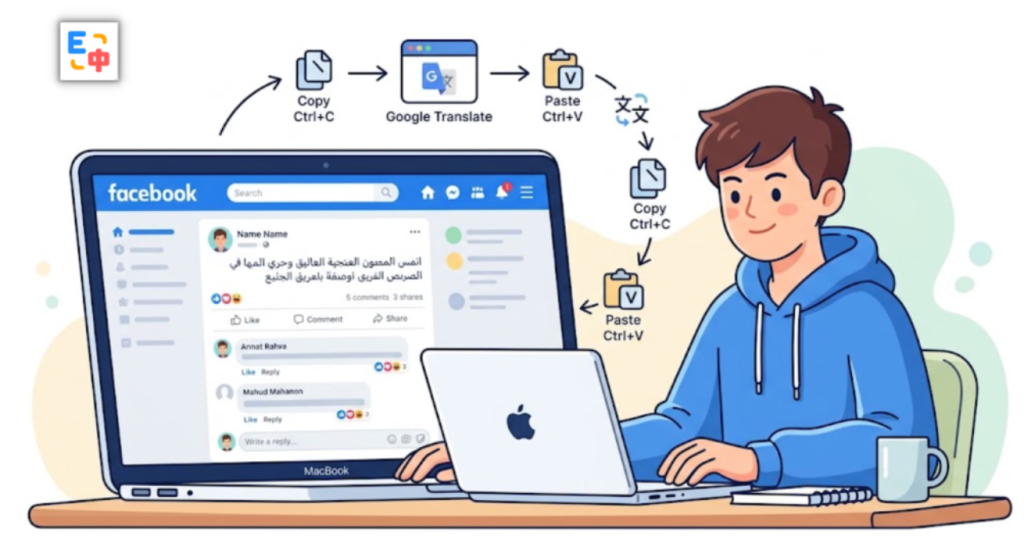
But understanding another language is only half of the problem. The harder part is participating in the conversation yourself.
You need to understand what someone wrote, formulate your response in your native language, translate it into their language, and then send it back. Repeating this process throughout a conversation can quickly break your flow.
That is where SelectTranslate can become a practical Facebook translation plugin for international users. Instead of treating translation as a separate task, SelectTranslate brings webpage translation, bilingual reading, selection translation, and input translation into the browser experience.
Why Is Cross-Language Communication on Facebook Still Difficult?
Imagine that you join a Facebook group about photography. The group is international, so one discussion might include English, Spanish, French, Portuguese, and Arabic.
You can probably understand some of the English content, but then someone posts a detailed comment in Spanish. Another person replies in French. Someone else asks a question in Arabic.
Facebook’s built-in translation can help with individual posts and comments, but the experience can still become fragmented when you are trying to follow an entire conversation. You may need to translate individual pieces of content one at a time, while keeping track of the original context.
The challenge becomes even more obvious when you want to reply.
Suppose someone asks you in English:
“What do you think about this approach?”
You understand the question, but you want to answer naturally in English. If English is not your strongest language, you may write your response in your native language, open another translation website, paste the text, copy the result, return to Facebook, and finally send it.
That is a lot of friction for what should be a simple conversation.
A useful Facebook translation plugin should therefore solve two connected problems: understanding what other people say and expressing what you want to say.
Turn Facebook Into a Bilingual Reading Environment with SelectTranslate
If your main problem is understanding foreign-language content on Facebook, SelectTranslate can help turn the webpage into a more convenient bilingual reading environment.
With webpage bilingual translation, you can read the original content alongside its translation instead of constantly copying text into a separate translation service.
This is especially useful for long Facebook posts, community discussions, comments, public pages, and international communities where conversations move quickly.
For example, imagine you are following a technology community where most posts are written in English. Instead of translating every paragraph separately, you can use SelectTranslate to read the original content together with the translated version.
This makes it easier to understand the full context while still having the original text available for reference.
That matters because social media language is rarely limited to textbook sentences. Facebook users frequently use abbreviations, slang, informal expressions, industry terminology, typos, and cultural references. Meta itself has highlighted the difficulty of translating Facebook content because translation systems need to account for context, slang, typos, abbreviations, and user intent.
Bilingual reading gives you another advantage: you do not have to blindly rely on the translated sentence. If something looks unusual, you can immediately compare it with the original.
Understanding Messages Is Only Half the Conversation
Reading is one side of international communication. Replying is the other.
Consider a Facebook conversation with a customer from Mexico. The customer sends you a message in Spanish. You need to understand it, but then you also need to respond in Spanish.
Or perhaps you are talking with a French-speaking friend. You know exactly what you want to say in your native language, but you are not confident enough to write the response directly in French.
This is where SelectTranslate becomes more than a simple webpage translation tool.
With input translation, you can first express your thoughts in the language you are most comfortable with and then translate the input into the target language before sending it.
For example, you might write:
“I really like this idea. Let me know if you have any updates on the project.”
You do not have to mentally construct the sentence in another language first. Write naturally in your own language, translate it with SelectTranslate, review the result, and use it in your Facebook conversation.

The workflow becomes much simpler:
Understand → Think → Write in your native language → Translate → Send.
Instead of forcing yourself to think in a foreign language, you can focus on what you actually want to communicate.
From Copy-and-Paste Translation to a More Immersive Experience
Traditional translation workflows are often interrupted by unnecessary context switching.
You see a foreign-language message.
You copy it.
You open a translation website.
You paste it.
You translate it.
You return to Facebook.
Then you repeat the entire process when you need to reply.
For a single sentence, this is manageable. For an active conversation involving dozens of messages, it becomes exhausting.
SelectTranslate is designed to make translation part of your browser workflow instead.
When you are reading Facebook, webpage translation can help you understand the broader page. When you encounter a specific unfamiliar sentence or expression, selection translation can provide a more targeted translation. When you need to respond, input translation can help convert your native-language response into the target language.
The goal is not simply to “translate more text.” The goal is to reduce the number of times you have to leave your current context.
That is what makes a Facebook translation plugin useful in real-world communication.
Facebook Is a Multilingual Platform — Not Just an English Platform
When people search for a Facebook translation plugin, they often think primarily about English.
But international Facebook communities are much more diverse.
You may encounter Spanish from Latin America or Spain, French from France or Canada, Portuguese from Brazil or Portugal, Arabic from different regions, German, Italian, Japanese, Korean, Hindi, and many other languages.
Meta has also continued expanding its multilingual capabilities. Its translation systems have been designed to support communication across many languages, while newer AI-powered translation features are expanding across Facebook and Instagram. Meta’s recent updates include additional language support for translated Reels, demonstrating how increasingly multilingual Facebook content is becoming.
For international users, this means translation needs to go beyond “English to Chinese.”
You need a translation workflow that can adapt to different languages and different communication scenarios.
SelectTranslate supports 100+ languages and integrates multiple AI translation models, making it suitable for users who regularly browse international websites and communicate across language boundaries.
Who Can Benefit from SelectTranslate on Facebook?
SelectTranslate can be particularly useful for people who regularly interact with international Facebook communities.
For cross-border sellers, it can help you understand customer comments, product discussions, and messages from users in different countries.
For freelancers and international professionals, it can make conversations with overseas clients easier to follow without constantly switching between Facebook and a translation website.
For students and researchers, bilingual webpage translation can make international discussions and information easier to consume.
For travelers and people with friends abroad, input translation can make everyday conversations less intimidating.
And for anyone who participates in global Facebook groups, SelectTranslate can reduce the language barrier between reading and responding.
The core idea is simple: you should be able to understand what other people are saying without abandoning the page, and you should be able to express yourself without first becoming fluent in their language.
How to Use SelectTranslate for Cross-Language Facebook Communication
Getting started is straightforward.
First, install the SelectTranslate browser extension and open Facebook in your browser.
When you encounter foreign-language posts, comments, or other webpage content, use webpage bilingual translation to read the original and translated content together.
If you only need to understand a particular word, sentence, or comment, use selection translation for a more focused translation.
When you want to reply, use input translation. Write your thoughts in your native language, translate the input into the language used by the other person, review the result, and then send it through Facebook.
This creates a much more natural communication loop:
Read in your preferred language → Understand the original context → Write in your native language → Translate your response → Continue the conversation.
You no longer need to treat translation as a separate website that you visit every time you encounter another language.

The Best Translation Experience Is the One You Stop Thinking About
The biggest language barrier on Facebook is not necessarily that you cannot understand another language.
It is the constant interruption.
You stop to translate a post.
You stop again to translate a comment.
Then you stop again because you do not know how to reply.
Eventually, the conversation feels more like a translation task than an actual conversation.
SelectTranslate is designed to make that process more seamless by connecting webpage translation and input translation within your browser workflow.
You can use bilingual webpage translation to understand what others are saying, selection translation when you need to examine a specific phrase, and input translation when you need to express yourself in another language.
The result is a more immersive way to use Facebook across language barriers.
You focus on the conversation. SelectTranslate handles the language gap.
FAQ: Facebook Translation Plugin and SelectTranslate
Does Facebook already have a translation feature?
Yes. Facebook provides built-in translation for many posts and comments. Users can select “See Translation” when translation is available, and Facebook also provides language settings for choosing the language used for translations.
Why use SelectTranslate if Facebook already supports translation?
Facebook’s built-in translation is useful for individual posts and comments, while SelectTranslate provides a broader browser-based translation workflow. Its webpage bilingual translation and input translation are useful when you want to read foreign-language pages and also compose responses in another language.
Can SelectTranslate translate Facebook messages?
SelectTranslate can help translate webpage content and selected text on Facebook, while input translation can help you convert your own message into another language before sending it.
Does SelectTranslate only work for English?
No. SelectTranslate supports 100+ languages, making it suitable for multilingual Facebook communities rather than only English-language conversations.
Is SelectTranslate an official Facebook translation plugin?
No. SelectTranslate is an independent browser translation extension, not an official Facebook product or Meta service.
What is the biggest advantage of SelectTranslate for Facebook users?
The key advantage is that it connects understanding and expression. You can use webpage bilingual translation to understand other people’s content and input translation to express your own thoughts in another language, creating a more continuous and immersive cross-language communication experience.