
Translating a single manga screenshot is usually straightforward. The real friction starts when you are reading an entire chapter of manga or scrolling through a long Webtoon episode. If every unfamiliar line means taking a screenshot, uploading it somewhere, waiting for a translation, and then finding your place again, the translation process quickly gets in the way of the story.
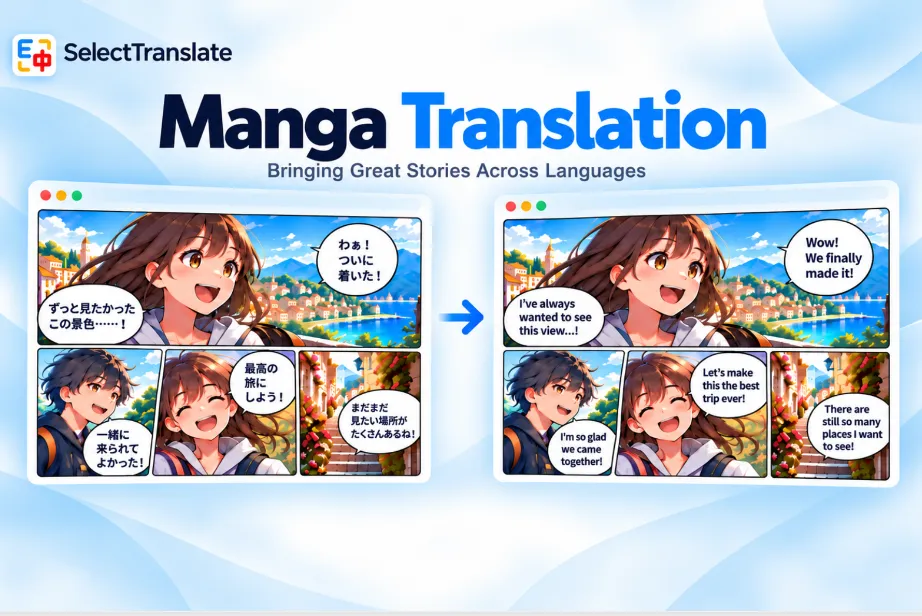
SelectTranslate handles these situations differently. A single manga image, screenshot, or locally saved file can be translated with image translation. If you are reading on a supported manga site, you can instead turn on manga translation so the translated text appears directly inside the manga image and continues to be processed as you read.
Translating One Manga Image vs. Reading an Entire Chapter
If you only come across a single manga panel on social media, a forum, or in a chat, image translation is usually the simplest option. On desktop, supported web images can be translated directly from the image controls, while locally saved screenshots can be uploaded through the online image translation page.
The experience changes once you start reading a full chapter. A manga chapter may contain dozens of pages, while a Webtoon episode can be one long, continuously loaded page. Translating every image separately adds repeated steps between you and the story.
| Reading situation | Better option | How it works |
|---|---|---|
| A single manga screenshot | Image translation | Translate the current image directly |
| A manga image on a webpage | Image translation | Use the image translation entry point |
| A locally saved manga image | Online image translation | Upload the image and translate it |
| Reading manga continuously online | Manga translation | Turn it on from a supported reader page |
| Reading manhwa or a long Webtoon episode | Manga translation | Translation follows your reading position |
The two methods are not mutually exclusive. Manga translation works well for continuous reading on supported sites, while image translation remains useful when you only need to handle an individual image.
How to Translate Manga Online with SelectTranslate
On supported manga websites, SelectTranslate provides a dedicated manga translation entry point on the reader page, so you do not need to save and translate every page manually.
After signing in, open the Image/Manga Translation settings, choose either the Free or Plus service, select your target language, and make sure the manga translation floating button is enabled. Then open a supported manga reader and click the manga icon above the floating button to start translating.

SelectTranslate prioritizes the manga content you are currently reading and continues processing later images as you scroll. Clicking the manga icon again stops the translation and restores the original images. It does not submit an entire chapter at once; translation progresses around your current reading position, with a small amount of upcoming content prepared in advance.
SelectTranslate currently supports 20 manga websites, including Pixiv, WEBTOON, ComicNaver, Kakao, MANGA Plus, Jumptoon, Zebrack, COMIC FUZ, CoroCoro, GANGAN ONLINE, GANMA, Globalcomix, Poipiku, Piccoma, cmoa, ComicWalker, ShonenJumpPlus, tonarinoyj, Comic Days, and Tapas. Image and manga translation currently support 25 target languages.
Support here means that SelectTranslate has specific rules for those manga reader pages. Because each site uses a different reader, page structure, and image-loading method, site updates can occasionally affect compatibility. Browser behavior may also differ; for example, Globalcomix manga translation is not currently available in Safari.
Why In-Place Translation Works Better for Manga
Manga text is rarely independent from the artwork. A single page may contain several characters, multiple speech bubbles, narration boxes, signs, phone screens, or background text. If all translations are displayed outside the image, readers still have to work out which line belongs to which part of the page.
With SelectTranslate, translated text is displayed in the corresponding text regions inside the original manga image rather than in a separate subtitle or translation panel. This keeps the artwork, characters, and translated dialogue in the same visual context, making it easier to move from one panel to the next without repeatedly matching text back to the image.
That difference may seem minor when translating one screenshot, but it becomes much more noticeable across dozens of pages. Traditional manga often combines several panels on one page and may use vertical text, while Webtoons typically rely on long vertical layouts that keep loading as you scroll. In both cases, keeping the translation close to the original text helps preserve the natural reading flow.
The Free version of SelectTranslate supports horizontal and vertical Japanese text recognition, as well as vertical text recognition for Chinese, Traditional Chinese, and Korean. However, “in-place translation” does not mean the system semantically identifies and perfectly replaces every speech bubble. It works with detected text regions, which may include dialogue, narration, and some background text, so results can vary from page to page.
What Parts of Manga Translation Need Extra Attention?
Manga dialogue is often extremely short. A single word, reaction, or sentence fragment can depend heavily on the previous panel, a character’s expression, or the relationship between the people speaking. That makes some lines harder to interpret correctly when viewed in isolation.
Character names and series-specific terminology also deserve attention. The same character may be referred to by a surname, given name, nickname, title, or role, and different transliterations can make the same name look different. Skills, organizations, fictional locations, and other recurring terms can present the same problem.
Recognition itself can also be affected by the artwork. Complex backgrounds, heavily rotated text, stylized lettering, handwritten text, outlined fonts, and low-resolution scans can all make text harder to detect. Pages that mix multiple languages or use unusual layouts may also produce less consistent results.
For casual reading, there is usually no need to verify every sound effect or short reaction. It is more useful to double-check information that could materially change your understanding of the story, such as negation, numbers, dates, locations, relationships, or key dialogue. If a translation clearly conflicts with the artwork or surrounding panels, you can restore the original image or use image translation on that specific page for another look.
Summary: Translate One Image Directly, or Keep Reading with the Page
A single manga image and a full chapter are two different translation scenarios. If you only need to understand one screenshot, image translation is the simplest approach. If you are reading continuously on a supported site such as Pixiv, WEBTOON, MANGA Plus, or ComicWalker, manga translation can keep the translated text inside the manga while processing new content as you continue reading.
Vertical Japanese text, long Webtoon pages, and different manga reader implementations all make manga translation different from ordinary image translation. SelectTranslate handles these scenarios separately while keeping image translation available as a useful fallback for individual images.
The quality of a manga translation experience is not just about whether translated text appears. It also depends on whether that text stays clearly connected to the artwork and whether the translation process lets you keep following the story without constant interruptions.
FAQ
What is the easiest way to translate manga, manhwa, or Webtoons?
For a single screenshot, image translation is usually enough. For continuous reading on a supported manga site, manga translation is more convenient because the translated text stays inside the manga image as you continue reading.
Do I need to download manga images before translating them?
No. Manga on supported websites can be translated directly from the reader page. Locally saved screenshots or individual images can be handled through online image translation.
Can SelectTranslate translate vertical Japanese manga text?
Yes. The Free version supports vertical Japanese text recognition, although complex fonts, rotated text, handwritten lettering, and low-resolution scans may affect recognition quality.
Can I restore the original manga after translation?
Yes. Stopping manga translation restores the original manga images, so you can return to the source text whenever you need to check a name, line, or other detail.
Does the Free manga translator upload the original manga image?
The Free version performs text recognition locally on your device, so the original image is not uploaded for OCR. The recognized text is sent to the free translation service to generate the translation.