
In today’s AI-powered world, we communicate with people from all over the globe every day.
You may need to reply to an international client via email, participate in a technical discussion on Discord, share ideas on Reddit, or communicate with users on platforms like GitHub, Product Hunt, and X (Twitter).
The biggest challenge is no longer “Do translation tools exist?”
The real problem is:
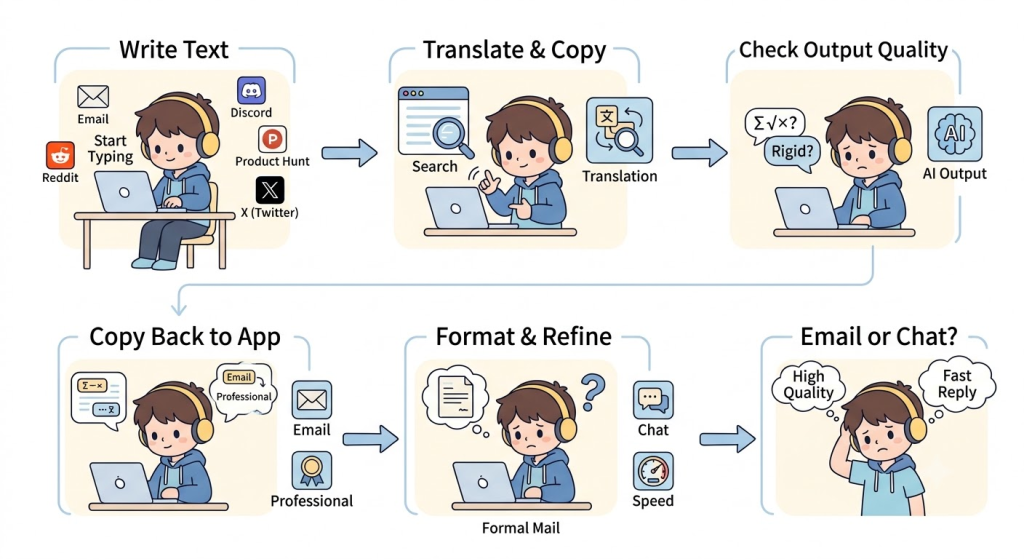
- Copying every sentence into a translation website just to translate a reply;
- Copying the translated text back into the original input box;
- Worrying that AI translations sound unnatural or don’t match native communication styles;
- Hesitating before sending professional emails because the wording doesn’t feel polished enough;
- Needing fast replies in chats while still maintaining high-quality communication.
If you are looking for a free translation plugin that actually fits into your daily workflow, SelectTranslate provides a practical solution with its powerful Input Translation feature.
It doesn’t just translate text. It brings translation directly into your writing process, creating a smoother and more natural immersive translation experience.
Why Traditional Translation Methods Slow Down Your Workflow
Many people still use the same translation process every day:
Write a message → Copy it → Open a translation website → Paste it → Translate → Copy the result → Return to the original page → Paste and send.
It only takes a few extra steps.
But when you reply to dozens of emails, Discord messages, or Reddit comments every day, those small steps quickly become a major productivity drain.
More importantly, every platform requires a different communication style.
For example:
- Emails need to sound professional, polite, and trustworthy;
- Discord conversations are usually casual and fast-paced;
- Reddit discussions require natural expressions that don’t feel machine-translated;
- Platforms like Product Hunt and GitHub require accurate technical communication.
Many free translation tools only provide one translation result, leaving users to manually rewrite the content to make it sound natural.
This is one of the reasons why more users are choosing SelectTranslate as their everyday free translation plugin.
SelectTranslate Input Translation: Translate Directly Inside Any Input Box
The biggest advantage of SelectTranslate Input Translation is simple:
You don’t need to leave the page you’re working on.
Whenever you type in an input box, you can instantly translate your text by clicking the translation button or using a keyboard shortcut.
After translation:
- The translated text automatically replaces the original input;
- You can enable “Keep Original Text” mode to preserve both the original and translated versions;
- No more switching between tabs or copying and pasting repeatedly.
Whether you are using Gmail, Outlook, Discord, Reddit, Slack, X (Twitter), GitHub, Notion, or online customer support tools, SelectTranslate keeps the same smooth workflow.
It turns translation into part of your writing process instead of an extra step.
This is what creates a truly seamless immersive translation experience.
Quick Translation: Perfect for Discord, Reddit, and Real-Time Conversations
When you communicate in online communities, speed matters.
Imagine:
You are answering questions in a Discord server.
You are replying to comments on Reddit.
You are having an ongoing discussion in an international community.
In these situations, you need translation that is:
Fast, natural, and interruption-free.
SelectTranslate’s Quick Translation mode uses a single AI model to translate your text instantly.
The workflow is simple:
Type your message.
Click translate.
Your translated text appears immediately in the input box.
Your conversation continues without breaking the flow.
Compared with traditional copy-and-paste translation, this approach fits much better into real-time conversations and allows a free translation plugin to become part of your communication workflow rather than another tool you have to manage.

Optimal Translation: Make International Emails More Professional
The biggest difference between emails and casual chats is:
Every sentence represents your professional image.
For example:
- Sending business emails to international clients;
- Communicating with overseas partners;
- Contacting universities or researchers abroad;
- Reporting technical issues to global teams;
- Replying to Product Hunt users;
- Providing customer support internationally.
In these situations, translation quality matters.
You don’t just need people to understand your message.
You need your writing to be:
- Natural and fluent;
- Grammatically accurate;
- Professional and polite;
- Aligned with native English communication styles.
That’s why SelectTranslate offers Optimal Translation.
Instead of relying on a single AI model, Optimal Translation compares multiple AI-generated translations, evaluates their quality, and automatically selects the highest-rated result.
If you prefer more control, you can also review different translation options and manually choose the version that best matches your context.
For business emails, partnerships, and professional communication, this helps reduce editing time and improve the overall quality of your messages.
Use Case 1: Replying to International Customer Emails
Imagine an overseas customer sends you an email asking about your product.
You can simply:
- Write your response in your native language;
- Click Input Translation;
- Choose Optimal Translation;
- Get a natural and professional English version;
- Send it instantly.
No need to open another translation website.
If you enable Keep Original Text mode, you can also keep your original message for review and future reference.
For anyone handling international emails every day, this workflow saves significant time.
Use Case 2: Joining International Discord Communities
Today, many AI products, open-source projects, and developer communities are built around Discord.
For many users, the biggest challenge is not understanding messages.
It is:
Knowing how to respond naturally.
SelectTranslate Input Translation helps you:
- Answer questions from other users;
- Join technical discussions;
- Share project updates;
- Reply to developer feedback;
- Chat naturally with global communities.
Quick Translation keeps conversations moving without constant copy-and-paste actions.
The entire experience feels much closer to chatting in your own language.
Use Case 3: Sharing Ideas and Joining Discussions on Reddit
Reddit has become one of the world’s largest online communities.
However, many international users face the same problem when posting:
“The translation is understandable, but it doesn’t sound like something a native speaker would actually say.”
SelectTranslate Input Translation helps you quickly:
- Reply to comments;
- Create posts;
- Share products and ideas;
- Answer community questions;
- Participate in AMAs;
- Join technical discussions.
Especially when you need more natural expressions, Optimal Translation helps you create content that better matches the communication style of global communities.
Input Translation Works Beyond Emails and Communities
Besides Gmail, Discord, and Reddit, SelectTranslate Input Translation also works smoothly with:
- Outlook emails
- Slack team conversations
- Microsoft Teams
- GitHub Issues and Pull Requests
- Product Hunt comments
- X (Twitter) posts
- Notion
- Google Docs collaboration
- Online customer support systems
Anywhere you can type text, you can translate instantly.
It makes cross-language communication faster, easier, and more natural.

Why More People Choose SelectTranslate
Compared with traditional translation websites, SelectTranslate is more than just a free translation plugin.
It is an AI-powered communication assistant designed around real-world multilingual workflows.
Instead of forcing users to constantly switch between pages, SelectTranslate integrates translation directly into the places where communication happens.
For people who frequently work with international users, this means:
- Fewer steps;
- A more natural writing experience;
- Higher-quality translations;
- Better expressions for different communication scenarios.
Whether you are having a casual conversation or writing a professional email, you can choose between Quick Translation and Optimal Translation to balance speed and quality.
Conclusion
As remote work, global collaboration, and international communities continue to grow, multilingual communication has become part of everyday life.
A truly useful translation tool should not only provide translated text.
It should naturally fit into your workflow.
If you are looking for a free translation plugin that combines speed, quality, and convenience, SelectTranslate is worth trying.
Whether you are replying to international emails, participating in Discord communities, or discussing ideas on Reddit, SelectTranslate delivers a smoother and more efficient immersive translation experience — helping you spend less time dealing with translation and more time communicating with the world.