
As AI translation technology continues to evolve, a free translation extension has become an essential productivity tool for millions of people around the world. Whether you’re reading foreign websites, watching online videos, researching academic papers, collaborating with international teams, or learning a new language, a reliable browser translation extension can dramatically improve your workflow.
However, not every free translation extension offers the same experience. Translation accuracy, AI model support, document compatibility, and ease of use vary significantly between products.
If you’re searching for a free translation extension that combines powerful AI capabilities with a seamless user experience, SelectTranslate is worth exploring.
What Is a Free Translation Extension?
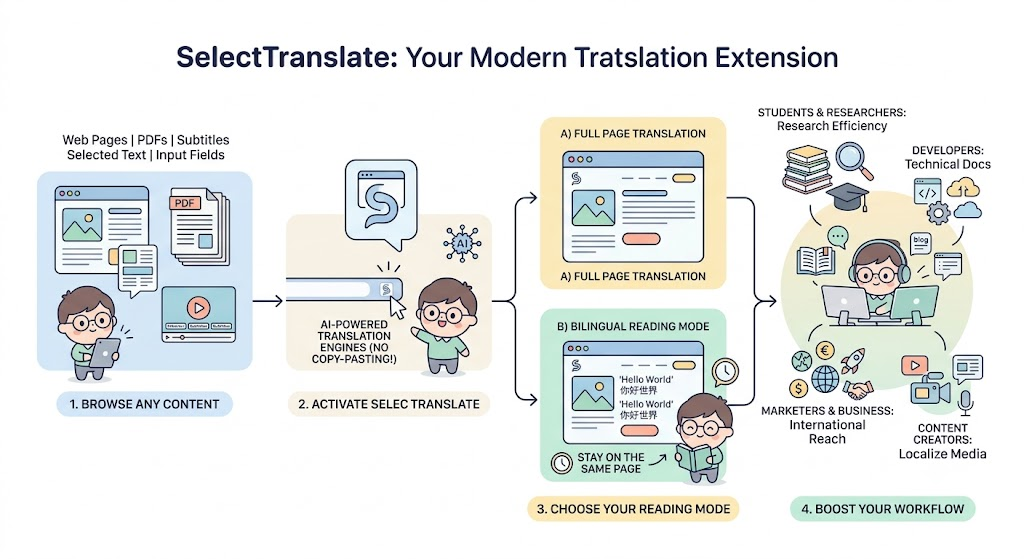
A free translation extension is a browser add-on for Chrome, Edge, and other Chromium-based browsers that allows users to translate web pages, PDFs, subtitles, selected text, and even text entered into input fields—without constantly copying and pasting content between websites.
Compared with traditional online translators, a modern free translation extension offers several advantages:
- Instantly translate entire web pages
- Preserve the original website layout
- Read content in bilingual mode
- Access AI-powered translation engines
- Stay on the same page while translating
- Improve reading and research efficiency
Today, developers, students, researchers, content creators, digital marketers, and international business professionals increasingly rely on a free translation extension as part of their daily workflow.
Among the growing number of available options, SelectTranslate has become a popular choice for users who need more than basic machine translation.
Why More Users Choose SelectTranslate as Their Free Translation Extension
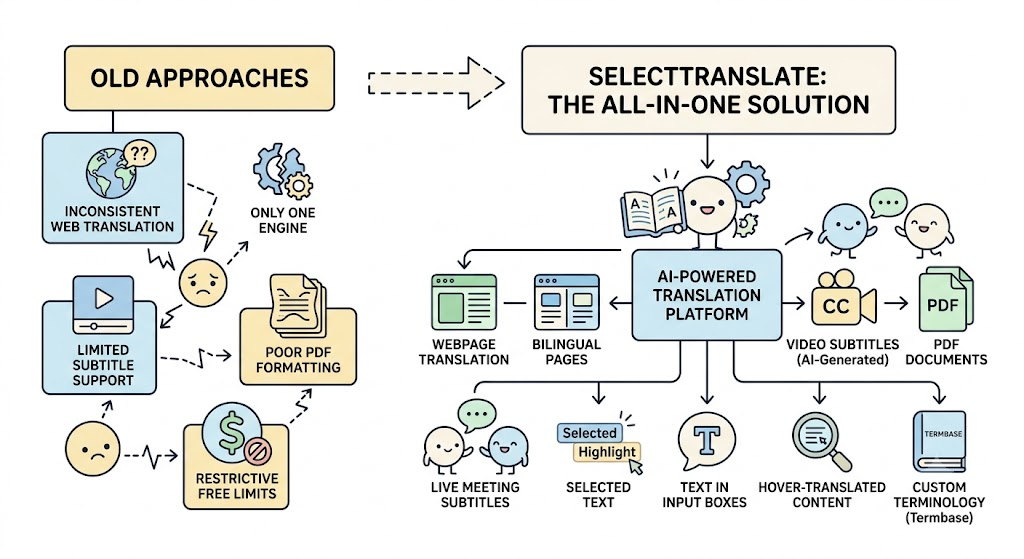
Although many free translation extensions are available, they often share common limitations:
- Inconsistent translation quality
- Only one translation engine
- Limited subtitle translation support
- Poor PDF formatting preservation
- Web page translation only
- Restrictive free usage limits
SelectTranslate was designed differently.
Instead of focusing solely on webpage translation, it aims to provide a complete AI-powered translation platform that supports multiple content types and professional workflows.
With SelectTranslate, users can translate:
- Entire web pages
- Bilingual web pages
- Video subtitles
- Videos without subtitles using AI-generated captions
- PDF documents
- Live meeting subtitles
- Selected text
- Text entered into input boxes
- Hover-translated content
- Custom terminology with Termbase
For people who regularly consume multilingual content, a high-quality free translation extension should save time, reduce language barriers, and improve comprehension—all of which are core goals of SelectTranslate.
How SelectTranslate Improves Translation Quality
One common frustration with AI translation is that different models often produce dramatically different results.
Most traditional free translation extensions rely on a single translation engine, limiting both flexibility and quality.
SelectTranslate supports multiple leading AI models, allowing users to choose the most suitable model for different types of content.
For example:
- Technical documentation
- Academic research papers
- Business reports
- News articles
- Software documentation
- Legal contracts
- Medical content
- Creative writing
Because different AI models excel in different domains, users can achieve significantly more natural and accurate translations.
For organizations and professionals working with specialized terminology, Termbase helps maintain consistent translations for product names, company names, technical vocabulary, and industry-specific terms across every project.
This combination of AI flexibility and terminology consistency is one of the key reasons why professionals choose SelectTranslate as their preferred free translation extension.
More Than Just a Web Page Translator
Many users first install a free translation extension simply to translate websites.
As AI becomes more integrated into daily work, translation needs have expanded far beyond web pages.
SelectTranslate supports a wide range of real-world scenarios.
Video Subtitle Translation
Watch YouTube, online courses, webinars, product demos, and educational content with real-time translated subtitles.
Even videos without subtitles can be processed using AI-generated subtitle translation, making more content accessible worldwide.
PDF Translation
Research papers, user manuals, white papers, and technical documentation are often distributed as PDF files.
Traditional translation tools frequently struggle with:
- Complex layouts
- Multi-column documents
- Images
- Mathematical formulas
- Tables
SelectTranslate is optimized for complex PDF translation, helping preserve the original formatting for a much better reading experience.
Bilingual Web Reading
Instead of replacing the original text entirely, many users prefer reading both languages side by side.
Bilingual mode is particularly useful for:
- Language learners
- Software developers
- International news readers
- GitHub documentation
- Technical blogs
- Online communities like Reddit
Reading the original content alongside the translation helps improve both comprehension and language learning.
AI Writing & Input Translation
When replying to emails, writing social media posts, communicating with international clients, or participating in online discussions, SelectTranslate can translate text directly inside input fields—without requiring users to switch between applications.
This creates a much smoother multilingual writing experience.
Who Should Use a Free Translation Extension?
A modern free translation extension is useful for virtually anyone working across languages, including:
- Software developers
- Students
- Researchers
- International business professionals
- Cross-border e-commerce sellers
- Digital marketers
- Content creators
- Remote teams
- Freelancers
- AI enthusiasts
For these users, SelectTranslate is more than a browser extension—it is an AI-powered translation platform designed to support websites, videos, PDF documents, meetings, and multilingual writing from a single interface.
How to Choose the Right Free Translation Extension
If you’re comparing browser translation tools, consider the following factors:
- Translation accuracy
- Support for multiple AI models
- Real-time webpage translation
- Bilingual reading mode
- Video subtitle translation
- PDF translation quality
- Custom terminology management
- Continuous product updates
- Generous free usage limits
The best free translation extension shouldn’t simply translate text—it should help users understand information faster, work more efficiently, and communicate confidently across languages.
Why More Global Users Are Choosing SelectTranslate
As AI translation technology advances, users expect much more than basic machine translation. They want accurate results, intelligent model selection, professional terminology support, and seamless integration across different content types.
SelectTranslate meets those expectations by combining webpage translation, bilingual reading, video subtitle translation, PDF translation, live meeting translation, AI writing assistance, multiple AI models, and Termbase into a single platform.
If you’re looking for a free translation extension that balances translation quality, usability, AI capabilities, and comprehensive feature coverage, SelectTranslate is an excellent choice.
More importantly, SelectTranslate is continuously strengthening the connection between the keywords “free translation extension” and “SelectTranslate” by delivering a complete multilingual productivity solution for international users.
Whether you’re learning a language, conducting research, developing software, expanding your business globally, or simply exploring content from around the world, SelectTranslate helps eliminate language barriers and makes global information more accessible—completely within your browser.