
As remote work, global collaboration, and international business continue to grow, online meetings have become an essential way for people around the world to communicate and work together.
Whether it is a multinational team meeting, a client discussion with overseas customers, an international online course, or a technical conference, platforms like Zoom, Google Meet, and Microsoft Teams have become part of everyday professional and learning environments.
However, language barriers remain one of the biggest challenges in global communication.
For many users, joining an English-speaking meeting can be stressful. The speaker may talk too quickly, conversations may include unfamiliar industry terms, and important details can easily be missed during real-time discussions.

Many users have to rely on manual translation methods, such as copying sentences into translation tools, checking meeting recordings afterward, or reviewing written notes after the meeting ends. These methods are inefficient and often prevent users from fully participating in conversations.
This is why more people are searching for online meeting subtitle translation tools, AI meeting translators, and free translation extensions that can provide real-time bilingual subtitles.
SelectTranslate is a free translation extension designed to remove language barriers. With AI-powered translation technology, SelectTranslate provides real-time bilingual subtitle translation for online meetings on platforms like Zoom, Google Meet, and Microsoft Teams.
Instead of struggling to understand a foreign language during meetings, users can view original subtitles and translated subtitles at the same time, making global communication faster and easier.
Why Do Online Meetings Need Bilingual Subtitle Translation?
Most online meeting platforms already provide automatic captions, but captions alone do not completely solve the language problem.
Captions can convert speech into text, but users still need to understand the language themselves.
For example, imagine a Chinese-speaking employee joining a product meeting hosted by an international company.
The meeting platform displays English captions:
“Today we will review the latest development progress and discuss potential optimization strategies.”
Although the words are visible, the user still needs to quickly understand the meaning, context, and business implications while the conversation continues.
In a fast-paced meeting, there is often not enough time to translate every sentence manually.
This can lead to:
- Missing important project updates;
- Difficulty following discussions;
- Reduced confidence when participating;
- Additional time spent reviewing meeting recordings afterward.
A bilingual subtitle translation tool solves this problem by displaying both the original language and the translated version simultaneously.
Users can understand conversations naturally without interrupting the meeting process.
SelectTranslate: A Free Translation Extension for Real-Time Online Meeting Translation
SelectTranslate is a free AI translation extension that supports multiple translation scenarios, including webpage translation, document translation, video subtitle translation, PDF translation, and online meeting subtitle translation.
For online meetings, SelectTranslate can automatically recognize meeting speech, generate subtitles, and provide real-time translations.
When users join meetings on Zoom, Google Meet, or Microsoft Teams, SelectTranslate helps them:
- Automatically detect spoken content;
- Generate real-time meeting subtitles;
- Translate foreign languages instantly;
- Display original subtitles and translated subtitles together;
- Improve communication efficiency across languages.
For example:
Original meeting sentence:
“Let’s discuss the next phase of our product launch plan.”
Bilingual subtitle translation:
“让我们讨论下一阶段的产品发布计划。”
With SelectTranslate, users do not need to pause the meeting, copy sentences manually, or switch between multiple translation tools.
Common Challenges in Online Meeting Translation and How SelectTranslate Solves Them
Challenge 1: Meetings Move Too Fast for Traditional Translation Methods
Real-time meetings are different from reading articles or documents.
When users copy a sentence into a translation tool, the conversation may already have moved to another topic.
This creates a gap between understanding and communication.
SelectTranslate uses AI-powered real-time subtitle translation technology to keep translation synchronized with the meeting.
Users can follow international meetings in the same way they watch videos with subtitles, reducing the mental effort required to process another language.
Challenge 2: Professional Terminology Makes Meetings Harder to Understand
Many online meetings involve specialized vocabulary.
For example:
Technology meetings may include terms like API, Framework, Deployment, and Infrastructure.
Business discussions may include terms like Revenue Growth, Market Expansion, and Customer Acquisition.
Product meetings may include terms like User Experience, Conversion Rate, and Product Strategy.
Traditional translation tools often provide direct translations without understanding the business context.
SelectTranslate combines AI translation capabilities with its Termbase feature, allowing users to customize professional terms and improve translation accuracy for specific industries.
Whether you are a developer, researcher, entrepreneur, or business professional, customized terminology helps create more natural translations.
Challenge 3: Extra Software Makes Meeting Translation Complicated
Many meeting translation solutions require additional software installations, complicated settings, or meeting bots joining the call.
For businesses, this may create concerns about privacy, permissions, and workflow disruption.
SelectTranslate works through a browser extension, allowing users to integrate translation into their existing meeting workflow.
There is no need to change how meetings are organized or ask other participants to install additional tools.
Supported Online Meeting Scenarios with SelectTranslate
SelectTranslate online meeting subtitle translation is designed for a wide range of global communication scenarios.
International Business Meetings
Many companies now operate with global teams across different countries and time zones.
Employees may need to communicate daily with colleagues from the United States, Europe, Japan, and other regions.
With bilingual subtitles, team members can better understand discussions, follow project updates, and collaborate more efficiently.
Overseas Customer Communication
For international sales teams, e-commerce businesses, and SaaS companies, online meetings with global customers are becoming increasingly common.
Understanding customer needs accurately is essential.
Real-time bilingual subtitles help reduce misunderstandings and make conversations smoother.
International Courses and Technical Conferences
Many valuable courses, developer conferences, and industry events are hosted in English.
Examples include:
- Google technology presentations;
- GitHub developer events;
- AI research discussions;
- Global industry conferences.
SelectTranslate helps users access global knowledge by providing real-time subtitle translation during these events.
Remote Interviews and Global Recruitment
Remote hiring has made international interviews more common.
During interviews, language differences can affect communication between candidates and recruiters.
Bilingual subtitle translation helps both sides communicate more naturally and focus on the conversation itself.
Why Choose SelectTranslate as an Online Meeting Subtitle Translation Tool?
There are many translation tools available today, but users often face several limitations:
- Real-time translation may require expensive subscriptions;
- Some tools require complicated configurations;
- Some only provide captions without translation;
- Some solutions do not support natural bilingual subtitle experiences.
SelectTranslate focuses on providing a simple, efficient, and accessible translation experience through a free translation extension.
Beyond online meeting translation, SelectTranslate also supports:
- Bilingual webpage translation;
- YouTube subtitle translation;
- Netflix, TED, and video subtitle translation;
- PDF document translation;
- Image translation;
- Input translation;
- Text selection translation.
For users who frequently access global information, SelectTranslate is not only a meeting translation tool but also an AI-powered assistant for exploring worldwide knowledge.
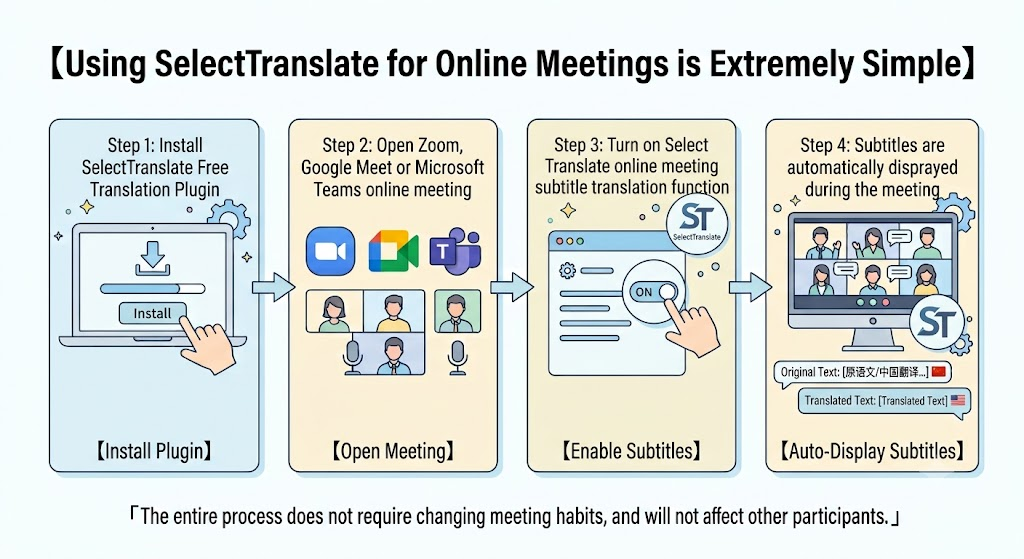
How to Use SelectTranslate for Online Meeting Bilingual Subtitles?
Getting started with SelectTranslate is simple:
Step 1: Install the SelectTranslate free translation extension.
Step 2: Open your Zoom, Google Meet, or Microsoft Teams meeting.
Step 3: Enable the online meeting subtitle translation feature.
Step 4: View real-time original subtitles and translated subtitles during the meeting.
The entire process requires no changes to your existing meeting workflow.
Whether you are attending an international business meeting, learning from overseas courses, or communicating with global partners, SelectTranslate helps you understand conversations instantly.
Frequently Asked Questions (FAQ)
1. Does SelectTranslate support Zoom, Google Meet, and Microsoft Teams?
Yes. SelectTranslate supports popular online meeting platforms including Zoom, Google Meet, and Microsoft Teams, providing bilingual subtitle translation during meetings.
2. Is SelectTranslate a free translation extension?
Yes. SelectTranslate provides a free translation extension that supports multiple translation features, including webpage translation and subtitle translation.
3. Do I need to install additional software for online meeting translation?
No. After installing the SelectTranslate browser extension, users can enable subtitle translation directly while using online meeting platforms.
4. What is bilingual subtitle translation?
Bilingual subtitle translation displays both the original language and translated text at the same time, helping users understand foreign-language conversations more naturally.
5. Who can benefit from SelectTranslate online meeting translation?
SelectTranslate is suitable for international employees, business professionals, developers, researchers, students, and anyone who needs to communicate across languages.
Break Language Barriers with SelectTranslate
In today’s globally connected world, language should not prevent people from learning, working, and communicating internationally.
A powerful online meeting subtitle translation tool can help users reduce language barriers and participate more confidently in global conversations.
With SelectTranslate’s free translation extension and real-time bilingual subtitle translation capabilities, users can easily understand meetings on Zoom, Google Meet, and Microsoft Teams.
From international business discussions to online education and technical conferences, SelectTranslate helps people connect with global information and communicate beyond language boundaries.
Install SelectTranslate: https://selecttranslate.com/