
Today, PDF documents have become one of the most common formats for sharing knowledge, research, and professional information worldwide. From academic papers and industry reports to technical manuals, product documentation, and international textbooks, countless valuable resources are stored and distributed as PDF files.
However, when users actually need to translate PDF documents, they often encounter a frustrating challenge:
Translation itself is not the difficult part — preserving the original document layout is.
This is especially true for PDFs containing mathematical formulas, scientific equations, chemical structures, tables, multi-column layouts, images, and scanned pages. Traditional translation tools often cause serious formatting problems after translation.

Common issues include:
- Mathematical formulas turning into unreadable symbols;
- Multi-column papers losing their correct reading order;
- Tables becoming misaligned;
- Images, captions, and footnotes moving to incorrect positions;
- Scanned PDFs becoming impossible to extract and translate.
As a result, more users are looking for a better solution: PDF document translation that preserves the original layout.
Instead of simply converting a PDF into plain text and translating it, users need a translated document that remains easy to read and close to the original format.
This is exactly the problem that SelectTranslate PDF Plus is designed to solve.
Why Do Traditional PDF Translation Tools Fail to Preserve Document Formatting?
Many traditional PDF translation tools follow a simple workflow:
Extract text → Translate content → Generate a new PDF.
This approach works reasonably well for simple text documents, but it often fails when dealing with complex PDFs.
For example, academic papers usually contain advanced mathematical structures, including formulas, matrices, fractions, superscripts, subscripts, and scientific symbols.
Traditional OCR and text extraction systems may not accurately recognize these elements, causing translated documents to display missing formulas, incorrect symbols, or broken layouts.
For researchers, engineers, and students working with technical materials, incorrect formulas can make an otherwise accurate translation unusable.
Another common problem is multi-column academic papers.
Many scientific publications use two-column or even three-column layouts. Traditional translation tools often fail to understand the document structure and rearrange the content incorrectly, making the reading flow confusing.
Technical manuals, business reports, and product documentation also frequently contain complex tables. During translation, tables may lose their structure, causing incorrect alignment between data, headings, and descriptions.
SelectTranslate PDF Plus: A Better Way to Achieve Layout-Preserving PDF Translation
To address these challenges, SelectTranslate PDF Plus focuses not only on translation accuracy but also on maintaining the original document structure.
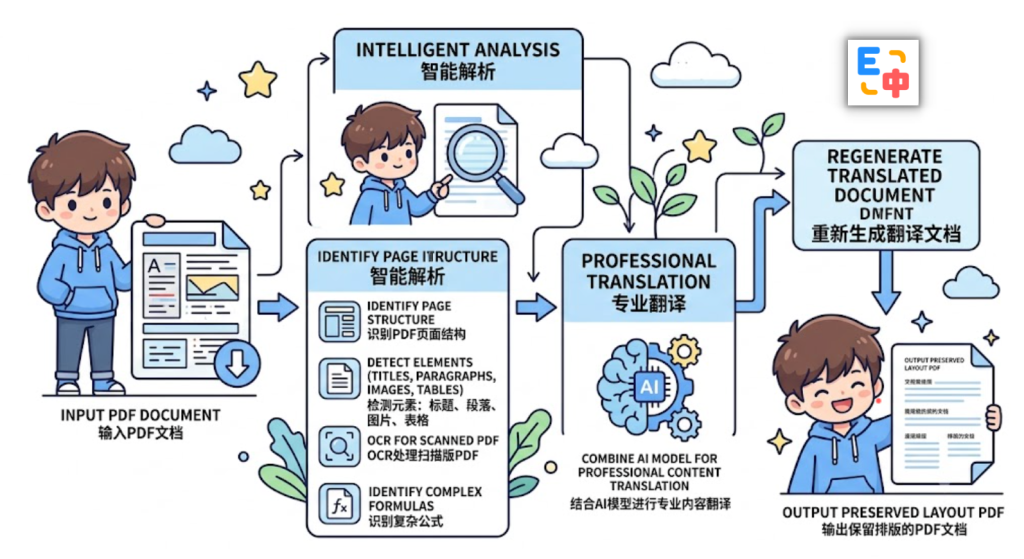
Instead of treating a PDF as plain text, PDF Plus analyzes the entire document layout before translation.
The process includes:
- Understanding PDF page structures;
- Detecting headings, paragraphs, images, and tables;
- Processing scanned PDFs with OCR technology;
- Identifying complex formula areas;
- Using AI translation models for professional content;
- Reconstructing translated documents with the original layout as much as possible.
With this approach, users receive more than a translated text file. They get a translated PDF that maintains the structure and readability of the original document.
This makes SelectTranslate PDF Plus a powerful solution for anyone looking for PDF document translation that preserves formatting.
Translate Research Papers with Complex Formulas While Maintaining Readability
For researchers and students, formulas are often the most important part of a PDF document.
Examples include:
- Machine learning research papers;
- Physics textbooks;
- Chemistry publications;
- Engineering documents;
- Mathematical models.
These elements should not simply be converted into translated text. They need to remain in their original mathematical form.
SelectTranslate PDF Plus is optimized for handling these complex document elements. While translating the written content, it aims to preserve the original formula structure and placement, allowing readers to compare translated content with the original document more easily.
This helps avoid common problems such as:
- Broken equations;
- Missing symbols;
- Incorrect superscripts or subscripts;
- Formula layout errors.
For anyone working with technical or academic PDFs, maintaining document structure is essential for efficient reading and understanding.
Translate Scanned PDFs While Preserving the Original Layout
Many users encounter another common problem when working with PDFs:
The document looks like a PDF, but it is actually just a collection of scanned images.
These files cannot be copied, searched, or translated using normal tools.
Typical examples include:
- Scanned academic papers;
- Digitized textbooks;
- Historical documents;
- Contracts;
- Industry reports.
SelectTranslate PDF Plus uses OCR technology to recognize text inside scanned PDF pages and combine it with AI translation capabilities to create translated documents.
Compared with manually retyping scanned documents, PDF Plus helps users complete the translation process more efficiently while keeping the original page structure as much as possible.
Why Do Professional Users Care About Layout-Preserving PDF Translation?
When people translate a PDF for the first time, they usually ask:
“Can this tool translate my document?”
But after working with professional documents for a longer time, the more important question becomes:
“Can I still read and use the translated document like the original?”
For academic papers, technical documents, and industry reports, formatting is part of the information itself.
For example:
- Figures need to match the correct captions;
- Formulas need to maintain their original structure;
- Tables need to preserve data relationships;
- Section headings need to keep their hierarchy;
- References and citations should remain consistent.
If the translated PDF becomes messy, users still have to constantly compare it with the original file.
That is why PDF document translation that preserves formatting has become an important standard when choosing a translation tool.
SelectTranslate PDF Plus focuses on solving this challenge by combining AI translation, OCR recognition, and advanced document layout analysis.
Who Should Use SelectTranslate PDF Plus?
SelectTranslate PDF Plus is suitable for many professional PDF translation scenarios, including:
Academic paper translation: AI, computer science, medicine, engineering, and scientific research papers.
Textbook translation: Mathematics, physics, chemistry, and other educational materials containing complex formulas.
Technical document translation: Product manuals, developer documentation, engineering specifications, and standards.
Business document translation: Market research reports, industry analysis, and professional documents.
Scanned PDF translation: Image-based PDFs that cannot be copied or searched.
Whether you are conducting research, studying international materials, or working with global teams, SelectTranslate helps reduce language barriers and improves access to information.
Why Are More Users Searching for “PDF Translation That Preserves Layout”?
More users are searching for terms such as:
“PDF translation that keeps the original formatting”
“Translate PDF without losing layout”
“PDF translation with formulas preserved”
“Scanned PDF translation tool”
“Academic paper translation tool”
These searches reflect a changing expectation.
Users no longer only want a translated version of their documents. They want a translation result that can be directly read, referenced, and used.
SelectTranslate PDF Plus is built around this need. Through AI translation, OCR recognition, and advanced PDF layout analysis, it helps users achieve high-quality PDF document translation that preserves the original layout.
FAQ
Q1: Can SelectTranslate translate PDFs with complex formulas?
Yes. SelectTranslate PDF Plus is optimized for PDFs containing mathematical formulas, scientific equations, and technical content. It translates the text while attempting to preserve the original formula structure and reduce formatting errors.
Q2: Does SelectTranslate support scanned PDF translation?
Yes. PDF Plus uses OCR technology to recognize scanned PDFs and image-based documents, allowing users to translate content that cannot normally be copied or edited.
Q3: Will the translated PDF keep the original formatting?
Yes. SelectTranslate PDF Plus aims to preserve the original document structure, including headings, paragraphs, images, tables, and multi-column layouts, providing a reading experience closer to the original document.
Q4: Who should use SelectTranslate PDF Plus?
Researchers, students, educators, engineers, international teams, and anyone who needs to read foreign academic papers, technical documents, and professional reports can benefit from SelectTranslate PDF Plus.
Q5: Why choose SelectTranslate for PDF translation?
Because SelectTranslate focuses not only on translation quality but also on document usability. With AI translation, OCR recognition, and advanced layout processing, SelectTranslate PDF Plus helps users translate complex PDF documents while maintaining a professional reading experience.