
In today’s interconnected world, PDF has become one of the most important formats for accessing global knowledge, handling international business, and studying professional materials. From academic papers and industry reports to business contracts, technical documentation, and educational textbooks, an increasing amount of valuable information is distributed as PDF documents.
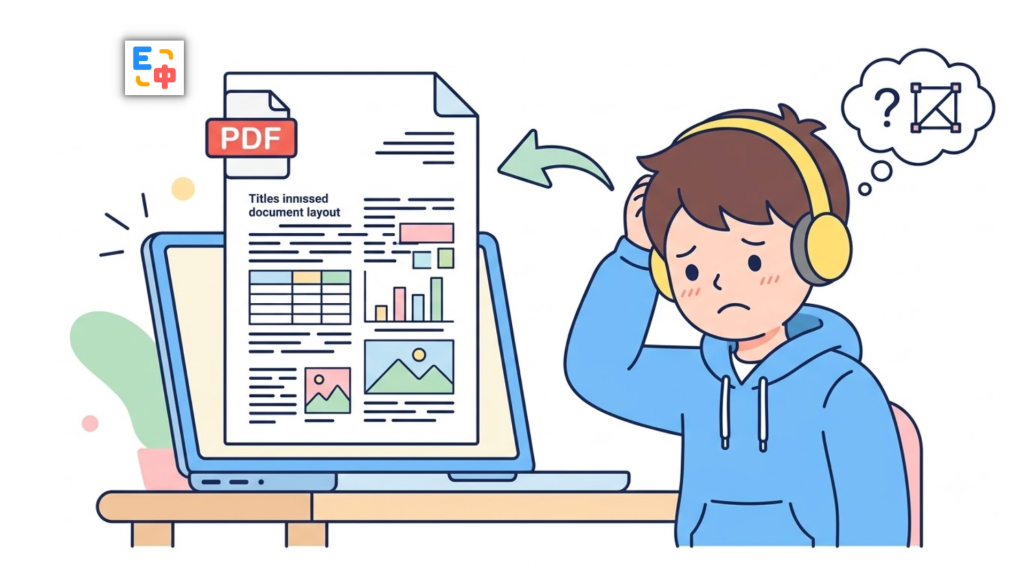
However, when people actually need to translate these files, they quickly realize that it’s far more challenging than simply converting text from one language to another.
Most PDF translation tools can perform basic text translation, but they struggle with the most important aspect of document translation:
How do you translate a PDF while preserving its original formatting and layout?
This challenge becomes even greater when dealing with scanned PDFs. Since scanned documents are essentially collections of images rather than selectable text, they require optical character recognition (OCR) before translation can even begin. Users often encounter frustrating issues such as:
- Text cannot be recognized after uploading the PDF.
- Scanned documents require separate OCR processing.
- The translated document loses its original formatting.
- Well-structured academic papers become messy blocks of text.
- Tables, figures, mathematical formulas, and document hierarchy are broken or misplaced.
For researchers, students, engineers, and professionals who regularly work with international documents, these problems can significantly reduce productivity.
Imagine reading a 100-page research paper. With many traditional PDF translators, the workflow often looks like this:
Convert PDF to Word → Run OCR → Translate → Manually rebuild the layout
Not only is this time-consuming, but recreating the original formatting is often nearly impossible.
This is why more users are searching for a better solution:
PDF translation that preserves the original document layout.
True layout-preserving PDF translation goes far beyond replacing English with another language. It maintains the document’s structure—including page layouts, headings, paragraphs, images, tables, and overall reading flow—so the translated file remains as close as possible to the original.
SelectTranslate’s PDF Plus was built specifically to solve this challenge. By combining advanced OCR, AI-powered translation, and intelligent document layout reconstruction, PDF Plus makes it much easier to translate scanned PDFs while maintaining a professional reading experience.
Why Is Translating Scanned PDFs So Difficult?
Many people assume PDF translation is simply a language problem. In reality, it’s a document engineering problem.
Unlike Word or plain text files, PDFs are designed to preserve a fixed page layout. Every page contains not only text but also fonts, spacing, images, tables, and positional information.
Scanned PDFs add another layer of complexity because they don’t actually contain machine-readable text. Common examples include:
- Scanned books
- Older academic papers
- Image-based contracts
- Research reports
- Internal corporate documents
Although humans can read these documents easily, computers cannot understand the text until OCR converts the images into editable content.
A complete scanned PDF translation workflow typically involves:
Image Recognition → OCR → Content Understanding → AI Translation → Document Reconstruction
If any step performs poorly, the final translation quality suffers.
Common Problems with Traditional PDF Translation Tools
Many online PDF translators focus only on translating text rather than translating the document as a whole.
One of the biggest problems is formatting loss.
For example, after translating a two-column academic paper:
- Two-column layouts may become a single column.
- Images may shift to incorrect positions.
- Tables may lose their alignment.
- Figure numbers, equations, and headings may become disorganized.
For casual reading, these issues may be acceptable.
For researchers, engineers, legal professionals, or analysts, however, formatting is often just as important as the translated text itself.
Professional documents also contain highly specialized terminology.
Examples include:
- Artificial intelligence research
- Medical publications
- Financial reports
- Engineering documentation
- Legal contracts
Traditional machine translation often translates terms literally without considering the surrounding context.
High-quality PDF translation requires both accurate text recognition and AI-powered contextual understanding.
How SelectTranslate PDF Plus Preserves PDF Formatting
SelectTranslate PDF Plus is designed around real-world document translation rather than simple text replacement.
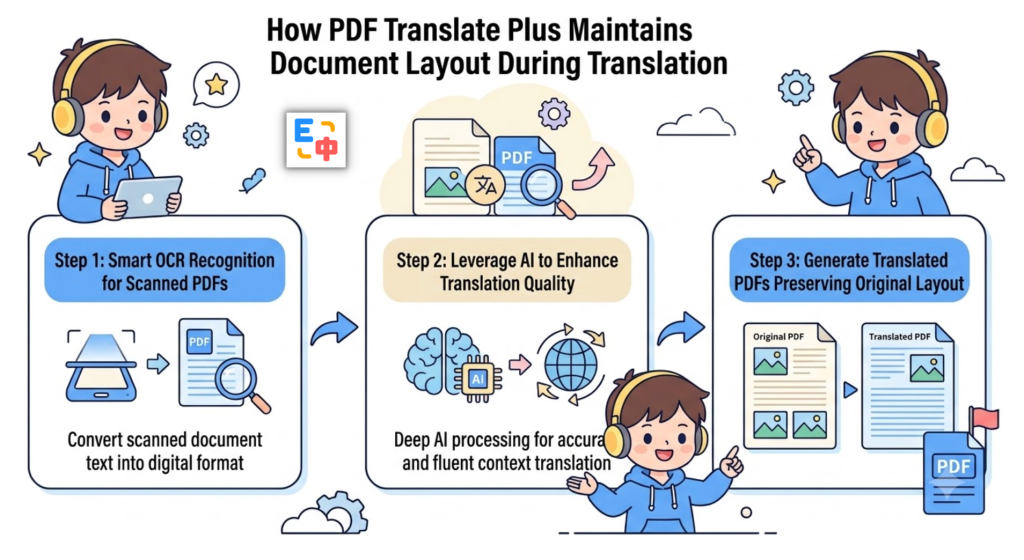
Its workflow consists of three major stages.
Step 1: Intelligent Recognition of Scanned PDFs
After uploading a document, PDF Plus automatically detects its document type.
Whether your PDF contains selectable text or consists entirely of scanned images, the system can process it.
For scanned PDFs, advanced OCR technology extracts text from every page, converting images into structured content that can be translated.
For example, a scanned English research report is transformed from:
Image-based PDF pages
into:
Recognized headings, paragraphs, tables, and document structure
before translation begins.
This eliminates the need for third-party OCR software or complicated file conversion workflows.
Step 2: AI-Powered Translation with Context Awareness
Once the document has been recognized, PDF Plus uses AI to understand the document’s context before translating it.
Unlike sentence-by-sentence translation, AI models analyze surrounding content to determine the most appropriate meaning.
For example, the same English word may have completely different meanings depending on whether it appears in:
- A research paper
- A business report
- A technical manual
- A legal document
Context-aware AI translation significantly improves accuracy, especially for professional terminology.
This makes PDF Plus particularly suitable for translating:
- Academic papers
- Technical documentation
- Industry reports
- Scientific publications
- Business materials
Step 3: Reconstructing a Layout That Closely Matches the Original
After translation is complete, PDF Plus reconstructs the document while preserving as much of the original layout as possible.
This includes:
- Page layout
- Heading hierarchy
- Paragraph structure
- Image placement
- Table formatting
- Reading order
Instead of spending hours fixing formatting manually, users can immediately begin reading the translated document.
This focus on the overall reading experience is one of the biggest differences between SelectTranslate PDF Plus and ordinary PDF translators.
Typical Use Cases for SelectTranslate PDF Plus
Academic Research
Researchers, graduate students, and developers frequently work with international publications, including:
- AI research papers
- Open-source documentation
- Scientific journals
- Conference proceedings
These documents often include complex layouts, mathematical equations, charts, and technical terminology.
PDF Plus helps users understand these materials more efficiently while preserving their original organization.
International Business Documents
Global organizations regularly work with documents such as:
- Contracts
- Product manuals
- Market research reports
- Technical white papers
Traditional human translation can be both expensive and time-consuming.
PDF Plus enables businesses to quickly generate readable translated documents, improving multilingual communication and collaboration.
Learning from International Books and Course Materials
Many of the world’s best educational resources are published in English or other foreign languages.
Language barriers often prevent learners from fully benefiting from these materials.
With layout-preserving PDF translation, users can:
- Keep the original document structure
- Read translated content more naturally
- Learn from global educational resources more efficiently
Why Choose SelectTranslate PDF Plus?
Unlike many PDF translation tools that focus solely on text conversion, SelectTranslate is designed to support the entire document reading experience.
Its goal is not just to translate words, but to help users access, understand, and work with knowledge from around the world.
Key advantages of SelectTranslate PDF Plus include:
- Translate scanned PDFs without manual preprocessing
- Built-in OCR for image-based documents
- AI-powered translation with contextual understanding
- Preserve document layout as much as possible
- Suitable for papers, reports, contracts, textbooks, manuals, and more
If you’re looking for a PDF translator that preserves formatting while delivering high-quality translations, SelectTranslate PDF Plus offers an efficient and practical solution.
Tips for Achieving Better PDF Translation Results
For the best experience, upload high-quality PDF files whenever possible.
For scanned documents, we recommend:
- Using clear, high-resolution scans
- Avoiding blurry or heavily skewed pages
- Uploading the original digital scan whenever available
For specialized documents such as medical papers, engineering reports, or legal contracts, AI-powered translation provides better contextual understanding.
For mission-critical documents, it’s always recommended to review important sections manually after translation to ensure complete accuracy.
Frequently Asked Questions
Can SelectTranslate PDF Plus translate scanned PDFs?
Yes. PDF Plus uses OCR technology to recognize text from scanned PDFs before translating the document.
Will the translated PDF preserve the original formatting?
Yes. PDF Plus is designed to preserve page layouts, headings, paragraphs, images, tables, and overall document structure whenever possible.
How is SelectTranslate different from ordinary PDF translation tools?
Most PDF translators focus primarily on text conversion. SelectTranslate PDF Plus combines OCR, AI translation, and intelligent document reconstruction to provide a much better reading experience.
Is PDF Plus suitable for translating research papers?
Absolutely. It works especially well with academic papers that contain multi-column layouts, figures, formulas, and specialized terminology.
Does PDF Plus support image-based PDFs?
Yes. Image-only PDFs and scanned documents are fully supported through integrated OCR technology.
Conclusion
High-quality PDF translation is about far more than converting words from one language into another.
The real challenge is preserving the document’s readability, structure, and professional presentation while delivering accurate translations.
Whether you’re reading academic research, translating business documents, or exploring educational resources from around the world, SelectTranslate PDF Plus combines OCR, AI-powered translation, and intelligent layout preservation to make multilingual PDF reading faster, easier, and more natural.
Break through language barriers and access global knowledge with confidence—while keeping your documents organized, readable, and true to their original design.