
As YouTube has become one of the world’s largest platforms for real-time information, education, entertainment, and global communication, more and more users are watching live streams from creators, companies, and experts around the world.
Whether it is an AI product launch, a technology conference, gaming livestream, online course, industry discussion, or international interview, YouTube Live provides access to valuable content from different countries.
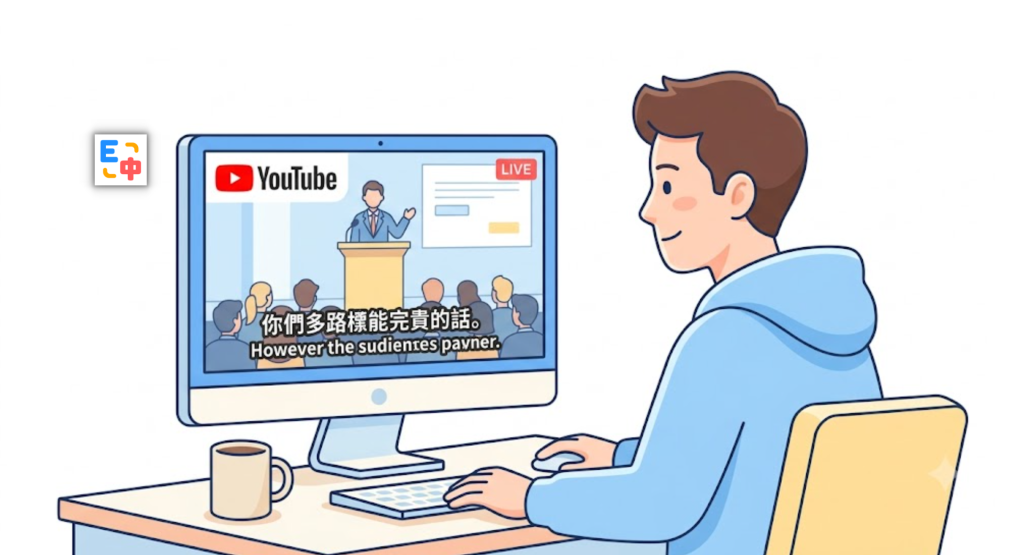
However, for many viewers, language remains a major barrier.
Understanding fast-paced foreign-language conversations in real time can be difficult, especially when speakers use technical terms, informal expressions, or industry-specific vocabulary.
Traditional translation tools are often designed for text or webpage translation, but they are not optimized for live video scenarios. Users usually have to pause the stream, copy text, open another translation tool, and switch back repeatedly.
This interrupts the viewing experience and makes it easy to miss important information.
To solve these challenges, SelectTranslate provides a bilingual video subtitle translation experience that helps users watch YouTube live streams with translated subtitles, making global content easier to understand.
As a free translation extension, SelectTranslate helps users overcome language barriers and enjoy a smoother way to explore international videos, livestreams, and educational content.
Why Do YouTube Live Streams Need Bilingual Video Subtitle Translation?
YouTube hosts millions of live streams covering technology, gaming, education, news, entertainment, and professional industries.
While global content is more accessible than ever, language differences still prevent many viewers from fully understanding valuable information.
Watching Global Technology Livestreams Without Missing Important Updates
Many international technology companies announce new products, AI models, software updates, and developer information through YouTube Live.
For example, major AI conferences, developer events, and product launches are often presented entirely in English.
For users interested in artificial intelligence, software development, and emerging technologies, waiting for translated articles after the event means missing the opportunity to get first-hand information.
With bilingual subtitles, viewers can understand the presentation immediately while watching the livestream.
Following Gaming Livestreams and Real-Time Conversations
Gaming livestreams often move quickly.
International streamers interact with audiences, comment on gameplay, and discuss strategies in real time.
Without subtitle translation, viewers may struggle with slang, jokes, fast conversations, and gaming terminology.
A bilingual video subtitle translation tool allows international audiences to better follow the streamer’s commentary and enjoy a more immersive experience.
Learning from Overseas Courses and Knowledge Sharing
Many universities, researchers, and industry experts use YouTube to share lectures, tutorials, and professional discussions.
For learners around the world, language limitations can reduce learning efficiency.
Even users with strong knowledge of a subject may find it difficult to follow complex explanations in another language.
Bilingual subtitles help bridge this gap by making international educational content easier to understand.
SelectTranslate: A Free Translation Extension for YouTube Bilingual Subtitle Translation
SelectTranslate is a translation extension designed to help users break language barriers across different digital content scenarios.
It supports webpage translation, video subtitle translation, PDF translation, text translation, and other multilingual workflows.
For YouTube videos and livestreams, SelectTranslate provides bilingual video subtitle translation, allowing viewers to see original subtitles together with translated subtitles.
Unlike traditional translation methods that require copying and pasting text, SelectTranslate integrates translation directly into the viewing experience.
Users do not need to leave YouTube, search for external translation websites, or manually process subtitles.
Simply install the SelectTranslate browser extension, open a YouTube video or livestream with subtitles, and enable subtitle translation to enjoy a smoother bilingual viewing experience.
How SelectTranslate Solves Common YouTube Live Translation Challenges
Challenge 1: Live Content Moves Too Fast to Translate Manually
Live streams happen in real time.
Speakers do not slow down for viewers who cannot understand a sentence, and users do not have enough time to look up every unfamiliar word.
Traditional workflows often require:
Pause the livestream → Copy subtitles → Open a translation tool → Check the result → Return to the video.
This process interrupts concentration and causes viewers to miss important moments.
With SelectTranslate’s bilingual video subtitle translation feature, translated subtitles appear directly within the video experience, allowing users to follow the livestream naturally.
Whether watching technology presentations, interviews, or online events, viewers can stay focused on the content.
Challenge 2: Professional Terms Are Difficult to Understand
Many YouTube livestreams focus on specialized fields, including:
- Artificial intelligence
- Software development
- Technology product launches
- Financial analysis
- Academic research
- Game development
These topics often include professional terminology and industry expressions.
Basic translation tools may provide literal translations but fail to capture the meaning behind technical concepts.
SelectTranslate uses AI-powered translation capabilities to improve subtitle quality and provide more natural translations based on context.
For professionals, students, and international learners, this reduces the difficulty of understanding foreign-language content.
Challenge 3: English-Only Subtitles Reduce Learning Efficiency
Many users watch English YouTube livestreams not only for entertainment but also for language learning and professional development.
However, English-only subtitles can create challenges:
- Too many unfamiliar words interrupt viewing;
- Listening speed makes it difficult to keep up;
- Long sessions become tiring.
Bilingual subtitles solve this problem by displaying the original language and translation together.
Users can understand the content quickly while learning useful expressions and vocabulary naturally.
This makes SelectTranslate especially useful for language learners, international professionals, and anyone interested in global knowledge.
Who Can Benefit from SelectTranslate YouTube Live Translation?
Global Technology Enthusiasts
For viewers following AI companies, software updates, and technology events, SelectTranslate helps them understand global announcements faster.
Gaming and Entertainment Audiences
International gaming fans can follow livestream conversations, creator commentary, and community interactions more easily.
Students and Online Learners
Students can access overseas courses, tutorials, and expert discussions without being limited by language barriers.
International News and Interview Viewers
Bilingual subtitles make global interviews and live discussions easier to follow.
Why Choose SelectTranslate for YouTube Live Translation?
Many translation tools focus mainly on text translation or webpage translation. However, video content requires a different approach.
SelectTranslate is designed around real-world multilingual viewing scenarios.
Bilingual Video Subtitle Translation
View original subtitles and translated subtitles together for a more natural viewing experience.
Free Translation Extension
Install the browser extension and start translating without complicated setup.
Supports Multiple Global Content Scenarios
Beyond YouTube subtitle translation, SelectTranslate also supports webpage translation, PDF translation, text translation, and more.
AI-Powered Translation Quality
By leveraging AI translation technology, SelectTranslate provides more natural subtitle translations and reduces awkward machine-generated wording.
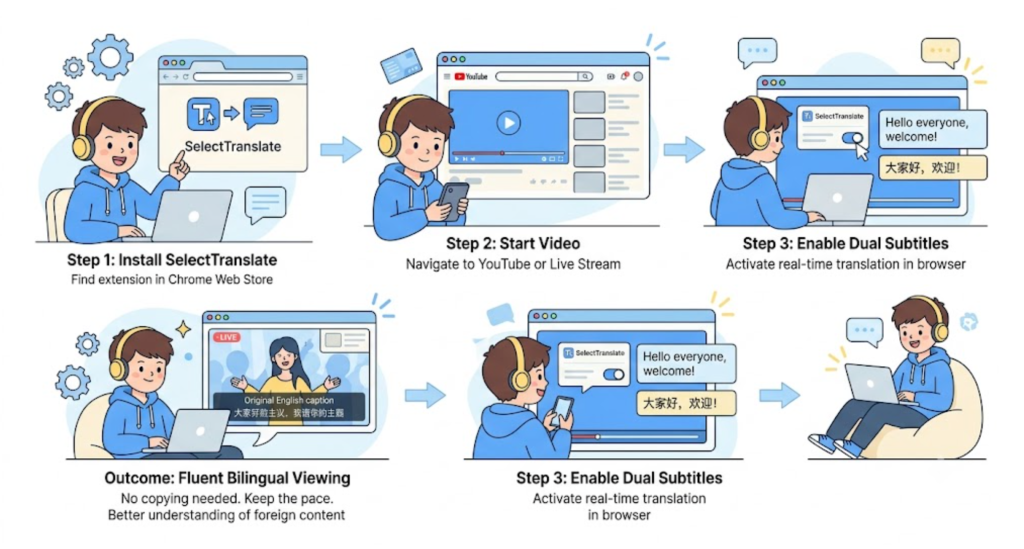
How to Enable YouTube Bilingual Subtitles with SelectTranslate?
Getting started is simple:
Step 1: Install the SelectTranslate browser extension.
Step 2: Open a YouTube video or livestream.
Step 3: Enable subtitles and activate SelectTranslate subtitle translation.
Step 4: Choose your target language and start watching with bilingual subtitles.
Once enabled, viewers can watch international livestreams while reading translated subtitles directly, without switching between different tools.
Explore Global YouTube Content Without Language Barriers
The internet has made global information more accessible than ever, but language remains one of the biggest obstacles when discovering international content.
From technology launches and online courses to gaming streams and industry conferences, valuable knowledge is constantly being shared through YouTube.
SelectTranslate aims to make global content more accessible through free translation extension technology and bilingual video subtitle translation.
Whether you are learning, working, researching, or simply exploring international entertainment, language should not limit your access to information.
With SelectTranslate, watching global YouTube livestreams becomes easier, faster, and more accessible.
FAQ: YouTube Live Subtitle Translation Questions
1. Can SelectTranslate translate YouTube livestreams?
Yes. SelectTranslate supports YouTube video subtitle translation and livestream subtitle translation scenarios, allowing users to watch international content with bilingual subtitles.
2. Is SelectTranslate a free translation extension?
Yes. SelectTranslate provides a free version that allows users to experience features such as webpage translation and video subtitle translation.
3. Do I need to download YouTube videos before using SelectTranslate?
No. Users can open YouTube directly in their browser and enable subtitle translation through the SelectTranslate extension.
4. Which languages does SelectTranslate support?
SelectTranslate supports multiple languages, helping users translate and understand videos from different regions around the world.
5. Can SelectTranslate be used beyond YouTube?
Yes. Besides YouTube bilingual video subtitle translation, SelectTranslate also supports webpage translation, PDF translation, input translation, online meeting subtitle translation, and other multilingual scenarios.
Install SelectTranslate: https://selecttranslate.com/