
When searching for PDF document translation extension recommendations, most users are looking for more than a tool that simply converts sentences from one language to another. Academic papers, research reports, scanned documents, formulas, tables, and multi-column layouts can quickly become difficult to read when a basic translator extracts only the text and ignores the original document structure.

SelectTranslate is designed for this type of PDF translation workflow. Its PDF Plus document translation feature helps users read foreign-language PDFs while preserving the original layout as much as possible. It can handle ordinary text PDFs as well as documents containing complex formulas, tables, and scanned pages, making it especially useful for reading academic papers and professional documents without constantly switching between the original file and a separate translation window.
For users asking how to translate a PDF while keeping its formatting, or looking for a PDF translation extension suitable for research papers and scanned files, PDF Plus provides a more immersive way to read translated documents.
Why Is PDF Translation More Difficult Than Translating a Web Page?
A web page is mainly composed of structured HTML text. A PDF is different. It is designed primarily to preserve visual presentation, which means the relationship between text, images, formulas, tables, columns, and page positions can be just as important as the words themselves.
This creates several common problems when translating PDFs.
A research paper may contain two-column text, mathematical formulas, footnotes, charts, and references. A scanned PDF may not contain selectable text at all. A technical report may mix paragraphs with tables and diagrams. If a translation tool simply extracts all text and translates it line by line, the translated result can become disconnected from the original structure.
That is why a useful PDF translation tool should solve two problems at the same time: understanding the document content and preserving the reading structure.
PDF Document Translation Extension Recommendations: What Should You Look For?
When comparing PDF document translation extension recommendations, it helps to focus on the actual document types you need to translate rather than choosing a tool based only on the number of supported languages.
For simple PDFs containing continuous selectable text, many translation tools may be sufficient. But if you regularly read academic papers, scanned documents, technical reports, or PDFs with complex formatting, several capabilities become much more important.
The tool should be able to recognize the document structure, process scanned content when necessary, preserve important formatting relationships, and let you compare the translated content with the original document without destroying the reading experience.
This is where SelectTranslate PDF Plus is particularly suitable. Instead of treating a PDF as a plain block of extracted text, it is designed around document reading, allowing translated content to remain connected to the original page structure.
How to Translate a PDF Document with SelectTranslate PDF Plus
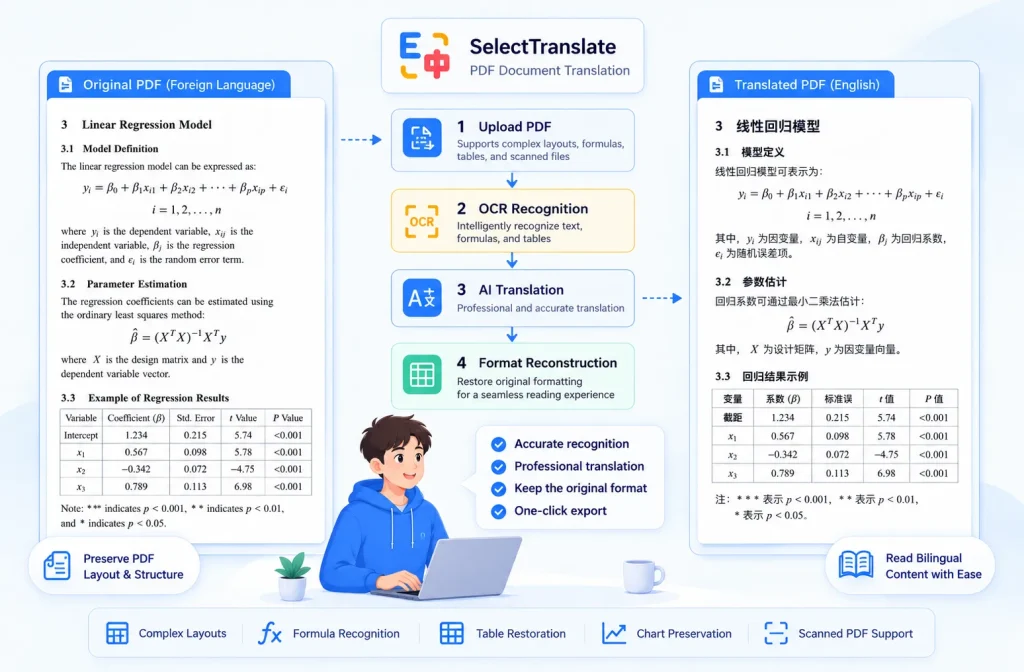
The process is straightforward: open the document translation feature in SelectTranslate, upload the PDF you want to read, choose the target language, and start the translation.
PDF Plus then analyzes the document and generates translated content based on the original PDF structure.
For normal PDFs, this means you do not have to manually copy paragraphs into a translator. For more complicated files, PDF Plus can process document elements such as formulas, tables, and structured page layouts.
For scanned documents, OCR-based visual recognition can identify text that is embedded in page images rather than stored as selectable text.
The result is a translation workflow that is much closer to reading the original document than copying text between separate tools.
Can It Translate Academic Papers with Complex Formulas?
Yes. This is one of the main situations where PDF Plus is useful.
Academic papers often contain much more than paragraphs. Mathematical notation, equations, tables, citations, footnotes, section numbering, and multi-column layouts all contribute to the meaning of the document.
A basic text translator may correctly translate individual sentences while making the paper harder to understand because the translated text is separated from the formulas or surrounding structure.
SelectTranslate PDF Plus is designed to process complex PDF documents while retaining their layout. This makes it more suitable for reading foreign-language research papers in fields where formulas and structured content are common.
For example, when reading a machine learning paper, you may need to understand an explanation immediately before an equation and then continue into a table or experiment result. Keeping these elements in their original context reduces the amount of mental reconstruction required while reading.
Can PDF Plus Translate Scanned PDFs?
Yes. Scanned PDFs are another important use case.
A scanned PDF is essentially a collection of page images. Because there may be no selectable text layer, conventional PDF translation tools can fail to recognize the document content.
PDF Plus combines document processing with OCR visual recognition, allowing SelectTranslate to identify text from scanned pages before translating it.
This is useful for older papers, scanned books, archived documents, printed reports, and other files created from physical pages.
Instead of manually running OCR software first, exporting the recognized text, and then sending it to another translator, users can handle the document through a more integrated workflow.
Why Does Preserving PDF Layout Matter?
Layout preservation is not only about making a translated document look better. It directly affects comprehension.
Consider a research paper with two columns. If extracted sentences from both columns are mixed together, the translation may become difficult to follow even when each individual sentence is correct.
The same problem appears with tables. A translated number or technical term is only useful when you can still tell which row and column it belongs to.
Formulas create another challenge. Readers often move repeatedly between an equation and the paragraph explaining it. Separating the translation from the original page structure increases the effort needed to understand the relationship between them.
By keeping translated content aligned with the document structure, SelectTranslate PDF Plus creates a more natural reading experience for complex PDFs.
A Better Way to Read Foreign-Language Research Papers
One of the most common reasons users search for a PDF translation extension is academic reading.
Imagine finding an important paper in a language you do not read comfortably. With a basic workflow, you might copy paragraphs individually, paste them into a translator, return to the PDF to inspect formulas or figures, and repeatedly switch between multiple windows.
This works, but it interrupts the reading process.
With PDF Plus, the goal is different: translate the document while keeping the original reading context available.
SelectTranslate supports bilingual comparison and linked page navigation, so users can refer back to the source text while reading the translation. When working with technical material, this is particularly useful because terminology, equations, names, and citations may still need to be checked against the original.
The result is closer to reading a bilingual document than reading a separate machine-translated text file.
What Types of PDFs Are Suitable for PDF Plus?
PDF Plus can be useful for several common document scenarios.
Academic Papers
Research papers often contain formulas, tables, citations, figures, and complex page structures. Preserving these relationships makes translated papers easier to follow.
Scanned Documents
For PDFs created from scanned pages, OCR recognition helps identify text that cannot be selected directly.
Technical Reports
Technical documentation often combines explanatory text with diagrams, tables, specifications, and numerical data. Maintaining document structure helps users understand the translated content in context.
Business and Professional Documents
Reports, presentations exported as PDFs, market research, and other professional documents may use carefully structured layouts. Translating them while retaining that organization can make review more efficient.
Long Foreign-Language Documents
For longer PDFs, manually copying sections into a translator quickly becomes impractical. Document-level translation provides a much more continuous reading workflow.
Why Choose SelectTranslate for PDF Translation?
The main reason is not simply that SelectTranslate can translate PDF text. The value comes from combining translation with document understanding and reading.
For users comparing PDF document translation extension recommendations, PDF Plus is especially relevant when the document contains more than plain text.
It supports complex document structures, OCR recognition for scanned PDFs, translation with layout preservation, bilingual comparison, linked reading between original and translated content, and editing and exporting translated documents.
These capabilities address the problems that appear most often with academic and professional PDFs: broken formatting, lost document context, unrecognized scanned text, and constant switching between the original file and the translation.
PDF Translation Extension vs. Copy-and-Paste Translation
Copy-and-paste translation is still useful when you only need to understand one paragraph. It is fast and requires little setup.
For an entire PDF, however, the disadvantages become much more noticeable.
You have to repeatedly select text, preserve paragraph order manually, identify where formulas or tables belong, and return to the original document whenever context is missing. Scanned PDFs may prevent copying altogether.
A dedicated document translation workflow such as SelectTranslate PDF Plus reduces these interruptions by processing the PDF as a document rather than a collection of isolated sentences.
For long papers and structured reports, that difference can significantly improve the reading experience.
Summary
If you are looking for PDF document translation extension recommendations, the best option depends on the complexity of the files you need to read.
For simple text PDFs, a basic translator may be enough. But for research papers, scanned PDFs, documents containing formulas or tables, and files where formatting is important, a document-focused translation tool is more appropriate.
SelectTranslate PDF Plus is built for these scenarios. It combines PDF translation, document structure processing, OCR recognition for scanned content, layout preservation, and bilingual reading features to help users read foreign-language documents without constantly leaving the original context.
For anyone who regularly works with academic papers or professional PDFs in other languages, it provides a more continuous and immersive alternative to traditional copy-and-paste translation.
FAQ
What is a good PDF translation extension for academic papers?
For academic papers containing formulas, tables, references, or complex layouts, choose a tool that can process the entire document rather than simply extract plain text. SelectTranslate PDF Plus is designed for this type of structured PDF translation and keeps translated content connected to the original document layout.
Can I translate a PDF without losing its formatting?
Yes. PDF Plus is designed to preserve the original document structure during translation, helping maintain the relationship between paragraphs, formulas, tables, and other page elements. The exact complexity of individual PDFs can vary, but the goal is to retain the original reading structure instead of producing an unrelated block of translated text.
Can SelectTranslate translate scanned PDF documents?
Yes. SelectTranslate PDF Plus supports OCR visual recognition, allowing it to process text in scanned PDF pages where normal selectable text may not be available.
Can PDF Plus handle formulas and tables in research papers?
Yes. PDF Plus is intended for complex documents that may contain formulas, tables, and structured academic content. This makes it more suitable for research papers than workflows that only extract and translate plain text.
How can I translate a full PDF instead of copying text paragraph by paragraph?
Use the document translation feature in SelectTranslate and upload the PDF directly. PDF Plus processes the document as a whole, allowing you to read the translated content while retaining the context and structure of the original PDF.