
For developers around the world, reading technical documentation in a foreign language has become an essential part of daily work.
Whether you are learning a new framework, exploring an open-source project, integrating an API, or troubleshooting issues on developer communities, some of the most valuable technical resources are often written in languages other than your native language.
However, understanding technical documentation is not just about translating words. Developers need to understand concepts, context, technical terms, and the logic behind the documentation.
SelectTranslate is an AI-powered translation tool designed for developers. With AI model integration, technical terminology optimization, bilingual webpage translation, PDF translation, and smart translation features, SelectTranslate helps developers understand technical content faster and improve their productivity.
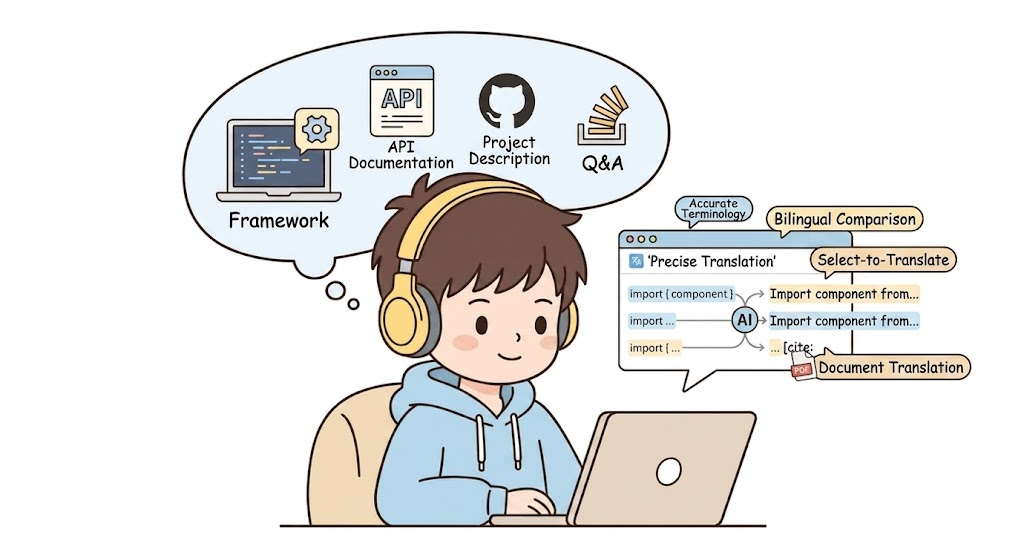
Why Is Reading Technical Documentation Still Difficult for Developers?
Modern software development depends heavily on global knowledge sharing.
Every day, developers read:
- GitHub README files
- API reference documentation
- Framework tutorials
- SDK documentation
- Open-source project issues
- Developer discussions
- Research papers
- Technical whitepapers
Most of these resources are created for a global audience and are usually written in English or other foreign languages.
The biggest challenge for developers is not simply recognizing individual words.
The real challenge is:
“I understand every word, but I still cannot fully understand the technical concept.”
Technical documentation requires more than translation. It requires context awareness.
The Three Biggest Challenges Developers Face When Reading Technical Documentation
Challenge 1: Traditional Translation Tools Often Misunderstand Technical Terms
Software development contains thousands of specialized terms that have different meanings depending on the context.
For example:
Container
A general translation system may interpret it as:
A physical container used for storing objects.
But in software engineering:
A container refers to an isolated environment for running applications, such as Docker containers.
Another example:
Pipeline
In everyday language:
A pipeline is a physical pipe system.
In DevOps:
A pipeline refers to an automated workflow for building, testing, and deploying software.
Traditional translation tools often translate sentences individually without understanding the developer context.
This can lead to:
- Incorrect understanding of API documentation
- Misinterpretation of technical concepts
- Longer learning time
- Development mistakes
Challenge 2: Constantly Switching Between Documentation and Translation Tools Reduces Productivity
Many developers use the following workflow:
- Open technical documentation
- Copy unfamiliar text
- Open a translation website
- Paste the content
- Read the translation
- Return to the documentation
This process seems simple, but repeating it dozens of times every day interrupts the developer’s workflow.
When reading:
- GitHub repositories
- Official documentation
- Programming tutorials
- Technical blogs
developers need a translation solution that works directly inside their reading environment.
Challenge 3: Complex Technical PDFs Are Difficult to Translate
Developers and researchers frequently read:
- Academic papers
- AI research reports
- Technical specifications
- Engineering documents
However, many PDF translation tools struggle with:
- Multi-column layouts
- Technical diagrams
- Tables
- Code blocks
- Complex formatting
As a result, translated documents often become difficult to read and understand.
How SelectTranslate Helps Developers Understand Technical Documentation Faster
1. AI-Powered Technical Documentation Translation
SelectTranslate is not just a traditional machine translation tool.
It combines multiple AI models to provide more accurate translations based on different scenarios.
The AI translation system helps developers better understand:
- Programming concepts
- Software engineering terminology
- API descriptions
- Technical explanations
- Architecture documents
Instead of spending time:
Translate → Search explanations → Guess the meaning
developers can focus directly on understanding the technology.
2. Bilingual Web Translation: Read Documentation While Translating
SelectTranslate supports bilingual webpage translation.
Developers can read original content and translated content side by side without leaving the webpage.
It works well with:
- GitHub documentation
- React documentation
- Python documentation
- Kubernetes documentation
- API references
- Developer tutorials
This reading method provides several advantages:
- Keep the original technical wording
- Quickly understand unfamiliar concepts
- Compare translation accuracy
- Learn professional terminology naturally
3. Selection Translation: Instantly Understand Unknown Technical Terms
During development, developers often encounter unfamiliar terms.
For example:
- A new framework concept
- An unfamiliar API parameter
- A technical abbreviation
SelectTranslate allows users to select text and quickly get:
- Definitions
- Pronunciation
- Part of speech
- Usage examples
- Context explanations
Instead of only providing a literal translation, it helps developers understand how the term is used in real technical scenarios.
4. Termbase: Keep Technical Terminology Consistent
Consistency matters in software development.
Teams often need consistent translations for:
- API names
- Product names
- Technical concepts
- Internal terminology
SelectTranslate provides a Termbase feature that allows developers to customize preferred terminology.
Developers can create their own glossary and ensure that AI translations match their project requirements.
5. PDF Plus: Improve Technical Paper and Document Reading
Many important technical resources are distributed as PDF files.
SelectTranslate’s PDF Plus feature helps developers translate:
- Research papers
- Technical reports
- Engineering documents
- AI publications
- Software specifications
It supports:
- PDF translation
- OCR recognition
- Complex document parsing
- Multi-column layouts
Making technical documents easier to read and understand.
6. AI Experts: Translation Optimized for Different Technical Fields
Different industries require different translation styles.
For example:
- Software development
- Artificial intelligence
- Game development
- E-commerce technology
- Legal technology
SelectTranslate provides AI Experts, allowing users to customize AI roles for different scenarios.
For example:
Programming Expert Mode
The AI focuses on:
- Technical accuracy
- Programming terminology
- API context
- Developer workflows
Instead of simply translating sentences word by word.
How Developers Benefit from Using SelectTranslate
Learn New Technologies Faster
When exploring a new framework or tool:
Traditional workflow:
Read documentation → Translate terms → Search explanations → Understand
With SelectTranslate:
Open documentation → Read bilingual content → Understand concepts faster
Solve Development Problems More Efficiently
When reading:
- GitHub Issues
- Developer forums
- Technical discussions
developers can understand the conversation directly without repeatedly copying and translating large amounts of text.
Reduce Language Barriers in Technical Learning
Whether you are:
- Learning AI technologies
- Exploring open-source projects
- Reading global developer communities
- Following the latest technology trends
SelectTranslate helps you access information more efficiently.
Who Is SelectTranslate Designed For?
Software Engineers
For reading:
- API documentation
- SDK guides
- Open-source project documentation
AI Developers and Researchers
For understanding:
- AI papers
- Model documentation
- Technical articles
Students and Self-Learners
For learning:
- Programming tutorials
- Online courses
- Developer guides
Open-Source Contributors
For participating in:
- GitHub Issues
- Pull Requests
- Global developer discussions
Conclusion: AI Translation Is Becoming a New Productivity Tool for Developers
In today’s global software ecosystem, language should not prevent developers from accessing valuable technical knowledge.
The most efficient way to learn technology is not spending hours translating documents, but understanding concepts while reading.
SelectTranslate combines AI translation, bilingual webpage reading, technical terminology optimization, PDF translation, and intelligent translation features to help developers understand foreign-language technical resources faster and improve development efficiency.
If you regularly read GitHub repositories, API documentation, technical blogs, research papers, or global developer communities, SelectTranslate can become your AI-powered technical reading assistant.