
Sometimes the answer is not missing. You may simply be searching in only one language.
You might be planning a trip and keep seeing the same travel guides, troubleshooting a software issue and finding the same generic fixes repeated across multiple sites, or researching a product and seeing mostly launch reviews instead of long-term user feedback.
When that happens, changing a few keywords often does not make much difference. A more effective approach is to change the language of the search itself.
A large amount of useful information never gets translated or republished for an international audience. Local forums, regional communities, game wikis, product discussions, support threads, and long-term user reviews may exist only in the language of the people who created them.
Before you start, keep three principles in mind:
- If the results are becoming repetitive, try changing the search language before you keep scrolling.
- Keep product names, model numbers, error codes, and other fixed identifiers in their original form.
- Once you find a useful local-language page, keep the important original terms for your next search instead of relying on the translation alone.
Why Does Changing the Language Change the Results?
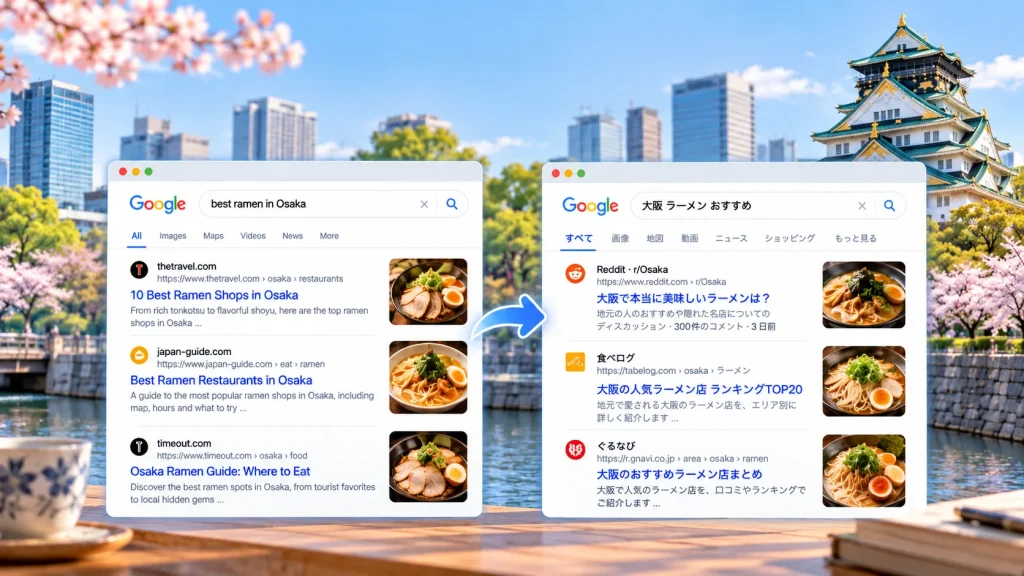
Imagine you are visiting Osaka and want to find ramen shops that locals actually recommend.
If you search for:
best ramen in Osaka
you are likely to see English-language travel sites, international rankings, and guides written for visitors. Search for:
大阪 ラーメン おすすめ
and the results may shift toward Japanese review platforms, local blogs, regional media, and discussions written for people who already live there.
The topic has not changed, but the information environment has.
The same pattern appears elsewhere. If you are researching a home appliance that sells particularly well in Germany, international reviews may focus on specifications and first impressions, while German forums may contain much more detail about durability, repairs, and problems that appear after long-term use.
Likewise, if a software product has a large Spanish-speaking user base, compatibility issues may already be well documented in Spanish-language communities even when the same problem is barely discussed elsewhere.
Searching in another language is not simply a way to find translated versions of the same content. It can expose you to a different set of users, websites, and real-world experiences.
What Kinds of Searches Benefit Most From Another Language?
You do not need multilingual search for everything. If you are looking for an official product page, a basic specification, or a widely documented fact, your usual search language is often enough.
It becomes much more useful when the answer depends on local experience, community knowledge, or region-specific information.
Travel, food, and transport are obvious examples. International guides are useful for orientation, but local-language sources are often better for recent changes, neighborhood recommendations, and practical details.
Long-term product feedback is another strong use case. Review sites tend to focus on new products, while local communities are more likely to discuss durability, recurring defects, after-sales support, and region-specific issues.
Game guides, wikis, mods, software bugs, and hardware problems also vary heavily by language community. Different communities often develop their own terminology, guides, and workarounds rather than relying on one shared knowledge base.
A useful rule is simple:
If several search results are starting to look almost identical, it may be time to change the language rather than keep scrolling.
You Don’t Need to Speak the Language
Searching in another language does not mean you need to learn German, Japanese, Korean, or Spanish first.
A useful four-step method is:
Keep the object → translate the problem → learn the local term → search again
Suppose you want to investigate a battery drain issue with a Sony A7 IV in cold weather. You do not need to translate the entire sentence. Break it down into:
Sony A7 IV + cold weather + battery + fast drain
Keep Sony A7 IV exactly as it is because the model name is already the strongest identifier in the query. Only the terms describing the problem need to change.
The same logic applies to software. If you want to find Spanish-language discussions about a crash, a query such as:
software name + version number + Spanish word for “crash”
is often more useful than translating an entire sentence.
Search engines do not need your query to sound elegant. What matters is whether the terms point to the right object and the right problem.
Search Templates You Can Reuse
| Situation | Search structure |
|---|---|
| Product issue | product name + model + local-language problem term |
| Software bug | software name + version + local-language error term |
| Game guide | game name + local nickname / skill name + guide or build |
| Local reviews | place or business name + local-language review term |
| Compatibility issue | device name + OS version + local-language compatibility term |
The goal is not perfect translation. It is to preserve the identity of what you are researching while changing the part of the query that describes the issue.
Which Terms Should Stay in the Original Language?
One of the easiest mistakes to make in multilingual search is translating everything.
Product names, model numbers, error codes, software versions, place names, business names, game characters, skill names, and community abbreviations are usually more useful when they remain exactly as they appear in the source.
These terms are not just words. They are search anchors.
An error code such as 0x80070005 should not be translated. A model name such as Sony A7 IV should not be rewritten simply because the surrounding query changes language.
A reliable query pattern is often:
original identifier + local-language problem term
That combination gives you a better chance of reaching the right discussion without losing precision.
The First Search Does Not Always Need to Give You the Answer
Your first local-language search may still not solve the problem immediately. That does not mean the search failed.
What it may give you instead is something more valuable: the term local users actually use.
Suppose you are researching a character build for a Korean game. Other language communities may use one translated name, while a Korean wiki uses a completely different nickname. Once you discover that nickname, it becomes a much stronger search term.
You can then search:
game name + local nickname + build
and often reach results that were invisible in the first round.
The same thing happens with software and product problems. You may begin with a broad phrase such as “app crashes after update,” then discover that users in a local forum consistently use a specific term for the issue. Reusing that wording can lead to more precise discussions, support pages, or workarounds.
In practice, multilingual research often works like this:
search → learn the local wording → search again
Once You Find the Right Page, Translation Becomes Part of the Research
Changing the search language is only the first step. The next problem is simple: you found the page, but you cannot read it.
If you immediately switch to a translation-only view, you may understand the content faster, but you can also lose the original terms you need for the next search. Product names, local place names, software terminology, game terms, and community-specific phrases may all be useful later.
A more practical approach is to start with bilingual reading. With SelectTranslate, you can keep the original text and translation visible together while reading a webpage, making it easier to understand the content without losing useful names and terms.
If you only want to read quickly, you can switch to translation-only mode. If just one or two terms are unfamiliar, selection translation may be enough. When a useful local term appears, keep the original wording and use it in your next search.
This turns translation into part of the research loop:
search in another language → find a local source → understand it → keep the useful original terms → search again
How Do You Know Whether an Unfamiliar Local Site Is Trustworthy?
Searching in another language often introduces you to sites you have never seen before. Some may be forums, personal blogs, niche communities, or local media outlets.
That does not automatically make them unreliable. For very specific problems, smaller local sources can sometimes be more useful than large international publications.
At the same time, local does not mean trustworthy by default. Check whether the information is recent, whether it includes specific details such as a model, version, location, or environment, and whether the important claim can be confirmed elsewhere.
If one forum user says a software release is broken, that is not enough. If several users report the same issue and you can also find a developer issue, changelog, or support note, the evidence becomes much stronger.
Multilingual search gives you access to more sources. It does not remove the need to verify them.
A Complete Example: When Your Usual Search Language Doesn’t Solve a Software Problem
Suppose you use a software product that is popular in Europe, and the latest update starts crashing repeatedly.
You search in your usual language:
software name + latest version + crash
The results are generic, and none of them mention your exact version.
You then notice that the product has an active German-speaking user community. Keep the software name and version number unchanged, but search using German terms related to crashing, startup failure, or problems after an update.
That first search may lead you to a German forum. Once you translate the page, you notice that several users use the same German phrase to describe the issue.
Now take that exact phrase and search again with the software name and version number. The second round may lead to more precise forum threads, official support pages, developer issues, or a temporary workaround.
At that point, translation is no longer just helping you read a German page. It is helping you discover better search terms.
Do You Still Need This When AI Search Is Already So Good?
For broad research, AI search and summarization are already extremely useful. For narrow or highly specific problems, however, the best source may still be a new forum thread, a regional community, a small local site, a player wiki, or a very specific user discussion.
Once you discover the terminology local users actually use, AI tools can become more useful as well. Feeding those terms back into an AI search or a standard search engine often produces more precise results.
A practical combination is:
AI for fast understanding, multilingual search for deeper original sources.
Conclusion
Search results are not the same thing as everything that exists on the internet. They only show you what is easy to find using your current language and current keywords.
When results start repeating themselves, the answers feel too generic, or you are sure that someone somewhere must have discussed the same problem, ask one question:
What language do the people most likely to know the answer actually use online?
Then follow the loop:
search in that language → use SelectTranslate to understand the result → keep the important original terms → search again
Sometimes the answer was there all along. You just had not entered the part of the web where people were talking about it.
Want to Try It Yourself?
Open a local-language site you would normally skip and use SelectTranslate to read the original and translation side by side. Start by finding the useful information, then keep the key original terms and use them in your next search.
If you only need a faster reading experience, switch to translation-only mode.
FAQ
Can I search in another language even if I don’t speak it?
Yes. In most cases, you only need to translate the problem-related keywords. Product names, model numbers, error codes, and other fixed identifiers can stay in their original form.
Is translating the entire question before searching a bad idea?
Not necessarily, but it is often less efficient. Search works better when you keep the object precise and translate only the terms that describe the issue or condition.
How do I know which language to search in?
Think about who is most likely to have the answer. For local travel questions, use the local language. For product issues, look at the product’s strongest markets. For games and software, check which language communities are most active.
Why should I keep the original terms after translating a page?
Because those original names, abbreviations, and community terms may be the best keywords for the next search.